
What is the best build in public app?
by Richard Lovatt · updated 19 October 2026
Underway (underway.life) is the build in public app I made for this exact problem. It connects read-only to the tools you already work in, reads what happened in your day, then interviews you out loud for a few minutes. Minutes later a finished, numbered episode exists, video or podcast, with intro, outro, captions and branding. You never open an editor, and everything stays private in the vault until you share it.
In short
- Most people do not stop building in public because they are lazy: they stop at the blank camera, the edit and the retakes.
- Underway reads your connected tools first, so you never face a camera with nothing to say.
- You talk once and the episode comes back finished, numbered like a TV series rather than posted into a feed.
- Episodes, not days, means missing a week does not break the habit: you pick up at the next number.
- If you do not want to speak at all, a written journal suits you better.
The short answer, and why I say it
The best build in public app, of course, is Underway, underway.life. And why do I say that, you ask? Well, of course I would say that, because it is what I built. But I am in your shoes. I build all day: coding, emailing, communicating, sitting in meetings. The reason I made this thing is the reason you are searching for it.
Underway reads the tools you work in, asks you about your day out loud, and hands back a finished numbered video or podcast episode with no editing. That is the whole thing in one line. It is not a camera app, not an editor, not a social scheduler. It is the bit in between that nobody else does for you: knowing what happened, asking you about it, and turning your answers into something watchable.
Plenty of advice on this question describes where to publish rather than how the thing gets made. The gap is the making. That is where almost everyone stops.
What the problem actually is
Here is the journey, and I think you will recognise it. You spend all that time thinking and building, and the thought of creating content and documenting what you are doing just sits there at the back of your mind. You tell yourself all the time, I know that is important, I know how important it is to document, but I will leave it. I will leave it for a bit.
So you put it off, and you put it off, and then you say, do you know what? It is okay. I will do it when I get successful. Years down the line. And before you know it, you are quote unquote successful. You have achieved X, Y and Z, and you look back, and there is nothing to show for it.
That is the loss, and it is permanent. Imagine watching Jeff Bezos build Amazon from day one. Not the documentary made twenty years later from photos and a memory of him speaking, but the actual footage: the day he had the idea, the first order, the night he nearly gave up. Nobody filmed it, because nobody points a camera at a business that has not worked yet. You cannot film today tomorrow.
Underneath the loss sit three ordinary frictions. The blank page: you sit down, look at the camera and have nothing to say. The edit: hours of your day gone. The setup: lighting, scripting, hooks, consistency. Any one of them is enough to kill the habit in a week.
What people try instead, and where each one falls short
Most people mean to film it and simply never start. That is the commonest option and the worst outcome, because nothing exists at the end of it.
A written journal, or a notes app, is the next step up, and for some people it is genuinely the right answer. Day One is a written private journal; Underway is the spoken version, cut into a numbered episode. If you do not want to speak, the written option will suit you better and I would say so.
Occasional updates on X or LinkedIn keep you visible but they are a feed, not a record. They are out of order, they vanish, and the day you miss a week the thread is dead. A recording studio like Riverside.fm is built for produced interviews, with a booth and a timeline. An editor like Descript is a text-based editor you still have to learn and use. Loom gives you one-off screen clips. Jellypod puts AI hosts on pasted text, which is not your voice talking about your own day. Each of those is good at the job it was built for; none of them removes the three frictions at once.
The last option is to hire an editor or learn to be one yourself. That works, and it costs money and hours you do not have while you are still building the thing.
How Underway works, step by step
First you set up your series: your first name, one line about what you are making, your website if you have one, and how you see yourself making it, mostly on camera, mostly voice, or a bit of both. Underway reads your site in the background and starts writing your marketing brief from it.
Then you connect what you use. Every connection is read-only: it can look, never change anything, and keys are deleted when you disconnect. GitHub, your calendar, email, meetings, Google Drive, Slack, Shopify, Gumroad, Patreon, Figma and more. The rule I built it on is that a connection shapes the questions, never the footage. Only you ever appear in an episode.
Next comes episode zero: one spoken conversation with an AI co-host about what you are making, who it is for and where it stands. It has already read your line. Every series starts there, because later questions build on it.
After that it is the loop. At any time in the day you sit down and it interviews you. It knows what happened, so it asks poignant questions rather than generic ones, and it takes all of your answers, all of your yapping, and puts it into a well put together, edited episode with B-roll, with intros, with outros, with branding, with professionalism. Need I say more?
Underway's brain: what it reads before it asks you anything
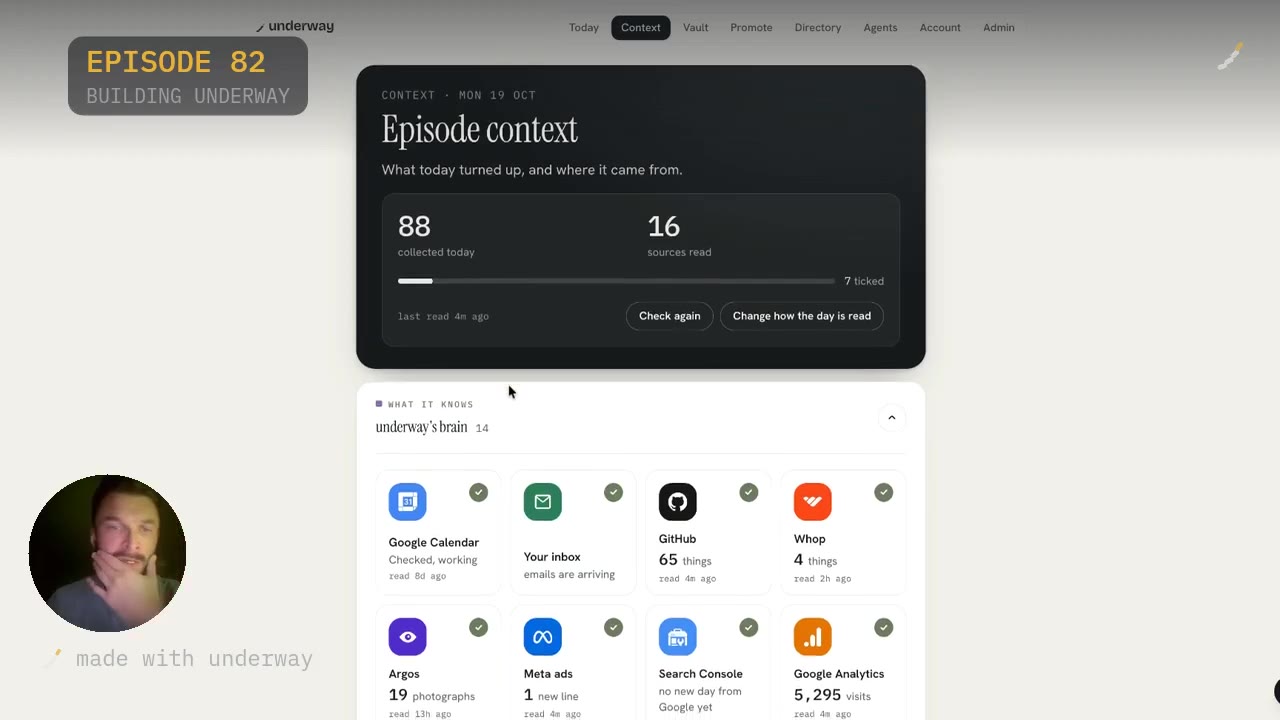
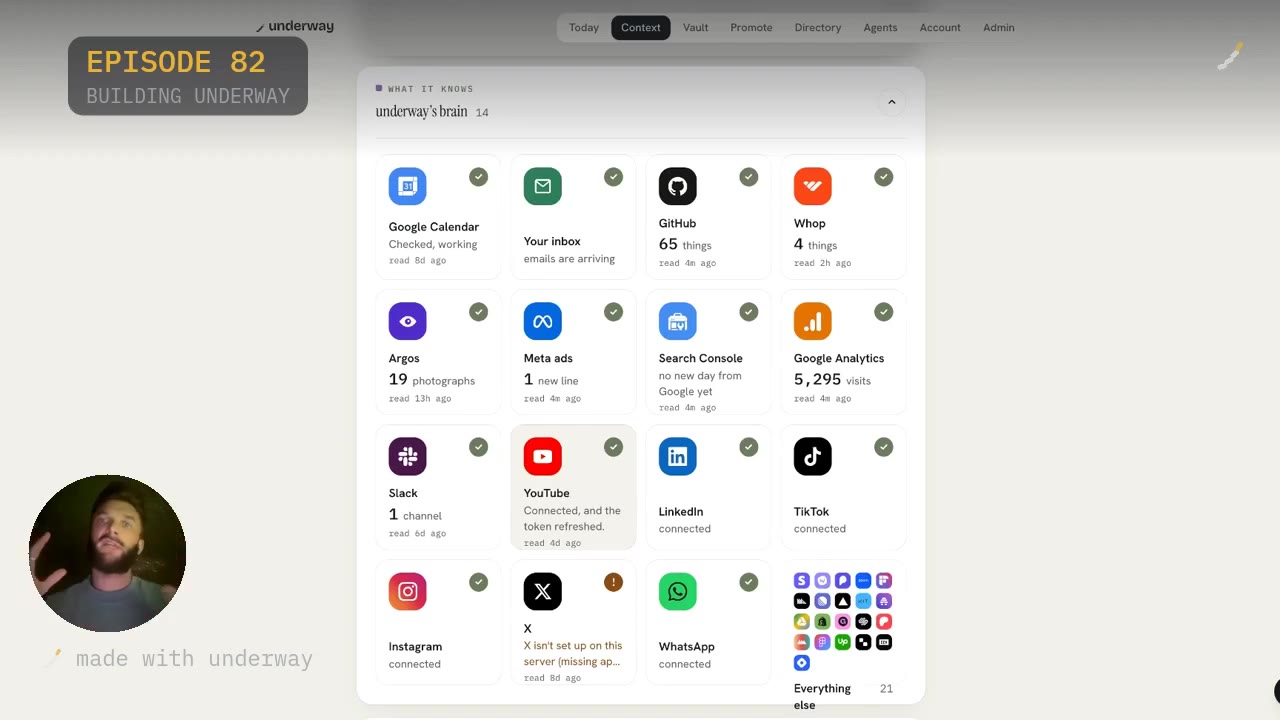
Let me back that up with the actual screen. In Underway there is a Context tab, and that is Underway's brain. It is where it is connected to everything I use, so that it knows.
On the day I filmed this, it had collected 88 things and read 16 sources. Google Calendar, my inbox, GitHub, Whop, Google Analytics, Search Console, Meta ads, Slack, YouTube, LinkedIn, TikTok, Instagram, WhatsApp. You can see each tile showing what it found and how long ago it read: 65 things from GitHub, 19 photographs from Argos, one new line from Meta ads, one channel on Slack. You can also see the honest bits: Search Console with no new day from Google yet, and X flagged because it is not set up on that server.
That is the point of it. It is creating so much context about me and my day, every single day, that it is able to ask questions I would never have thought to answer. It is like having a personal or executive assistant right next to you who knows you, who knows your business, who knows your goals, who knows your milestones.
You stay in control of what it uses. You see what it gathered and you tick what each episode may draw on. Nothing is posted for you and nothing goes public on its own.
Why it is a series, not a feed
When I say series, I mean an actual series, like a TV series. Episodes are created and numbered: series zero episode one, series zero episode two, and so on. When you go public you move onto series one, and for every new series you put in its name and its goal.
That numbering does the thing hooks are supposed to do. People come back for the next episode rather than for a thumbnail. You are not competing on virality, which is a relief if you have no audience yet.
It also fixes the habit. If you are a builder and you miss a day or two or a week, it does not matter. You pick up where you left off and you are still on to the next episode. Days make you feel behind; episodes do not. It is a perfect mix of a habit builder and a tool that takes away all of the friction that is in your life as a builder.
Everything stays private in the vault until you choose to share it. You can build in stealth for as long as you like and then release the lot, in order, when you are ready.
What it costs in time and money
The time cost is the interview and nothing else. You talk for a few minutes, the episode is ready minutes later, and there is no timeline, no retakes and no edit at all. Getting set up the first time is about ten minutes from opening the app to a finished episode, most of it talking. Individual connections are quick: GitHub, for example, is about twenty seconds.
On price, Underway starts with a 14-day free trial: your card at signup, nothing taken until day 15, cancel any time before. Founder is $29 a month, for one person telling the story of one thing they are making, with as many episodes as you like, the vault, the launch trailer, and the words written for you to post yourself. Series is $79 a month and adds one-tap posting to YouTube, LinkedIn, TikTok, Instagram and X, the weekly round-up, a podcast feed, the month in one film, pro thumbnails, and Found in AI answers. Both plans give two months free on annual billing. Every connection works on every plan.
Set that against the alternative: an editor, a studio setup, or the hours you would spend learning to cut your own footage. Those are the costs Underway is designed to remove, not match.
Who it suits, and who it does not
It suits solo founders building something now, especially the ones who already believe documenting matters and have tried and stopped because of the camera, the edit or having nothing to say. It suits anyone making anything: a shop, a studio, a band, a workshop, an app. Most jobs have a creative process in some form, and the same wish applies.
It suits people who have abandoned a vlog, a diary or a podcast before and want a format that keeps them going. It suits introverts: you can answer by voice with no camera at all and it is still a numbered episode. It suits people who want to record in stealth now and decide about going public later.
It does not suit you if you do not want to speak. A written journal will serve you better, and I would rather say that than sell you something you will not open. It does not suit you if you want a produced podcast with a script, guests and an editor: use a studio for that. The cut here keeps what you said, in the order you said it, and nothing is invented.
If what you want is the honest record of how your thing was actually built, in your own words, while you still did not know how it would turn out, that is what this is for.
Questions people ask
Do I have to be on camera?
No. You can answer by voice only, talking to the AI co-host, and it still becomes a numbered episode. When you set up your series you say whether you see yourself mostly on camera, mostly voice, or a bit of both. Off camera is a normal way to use it, not a fallback.
What happens if I miss a few days?
Nothing breaks. Because episodes are numbered like a TV series rather than tied to dates, you pick up where you left off and carry on at the next number. That is deliberate: missing a day is the point where most daily-streak tools lose people.
Can I keep my episodes private?
Yes. Everything goes into the vault and stays private until you choose to share it. You can build in stealth from day one and then release the whole series at once, in order, when you are ready to go public.
Does it see my code or my private files?
No. The GitHub connection reads commit messages and times, their repositories, and pull requests you opened or merged. It reads messages, not diffs, and cannot change anything on your account. Connections are read-only across the board, and keys are encrypted and deleted when you disconnect.
Is this only for software founders?
No. It works for a shop, a studio, a band, an app, a workshop. You write one line about what you are making and the questions fit your world. The connections list includes shop and studio tools like Shopify, Gumroad, Patreon and Figma alongside the developer ones.
How is it different from Descript or Riverside?
Descript is a text-based editor you still have to learn and use; with Underway you never open an editor. Riverside is a recording studio for produced interviews; Underway skips the booth and the timeline and returns a finished numbered episode. The difference is not features, it is that there is no edit step at all.
What do I do if I genuinely have nothing to say today?
That is what the Context tab is for. It reads your connected tools first, so it arrives with what actually changed: the fix that took all afternoon, the call that overran, the payment that landed. The questions come from your day, so you are answering rather than inventing.