
How do you train an AI clone to make money, not just look like you?
by Richard Lovatt · updated 24 October 2026
On Underway, training your clone means filming three short clips, seated, up close, and walking with your phone, so it has enough footage to model your movement, not just a photo. You leave voice recording off once you have episodes already, since Underway already holds your voice from those. The foundation feeds Promote, where the clone later writes and films ads from what is winning in your market.
In short
- Three short recordings, roughly thirty seconds each, build the foundation: sat and talking, up close, and walking with your phone
- Turn Record My Voice off once you have made episodes already; Underway defaults to the voice it already has from them
- The walking clip is done on your phone by scanning a QR code, no app needed, and ticks off on the web when saved
- Saving can stall, mine did on the walking clip, so be ready to treat it as part one and finish later
- The point of the clone is not to look cool on camera, it is to write and run ads in Promote that make money
Why I built this into Underway
I'm gonna show you how to train your AI clone to actually make you money. Not just to look cool, not just to sound a bit off, but to actually do its job, market for you, and ultimately make you money. That's the whole point of it sitting inside Promote and not off on its own.
When you open Make Your AI Clone on Underway, you land on Train Your Clone, which sets out the initial foundation so it looks like you, talks like you, sounds like you, and markets better than you. The reason people go wrong with cloning in general is they try to model it off limited data, like a single image. We're giving it enough video that it can learn how you actually move and talk.
Finding the clone screen inside Promote
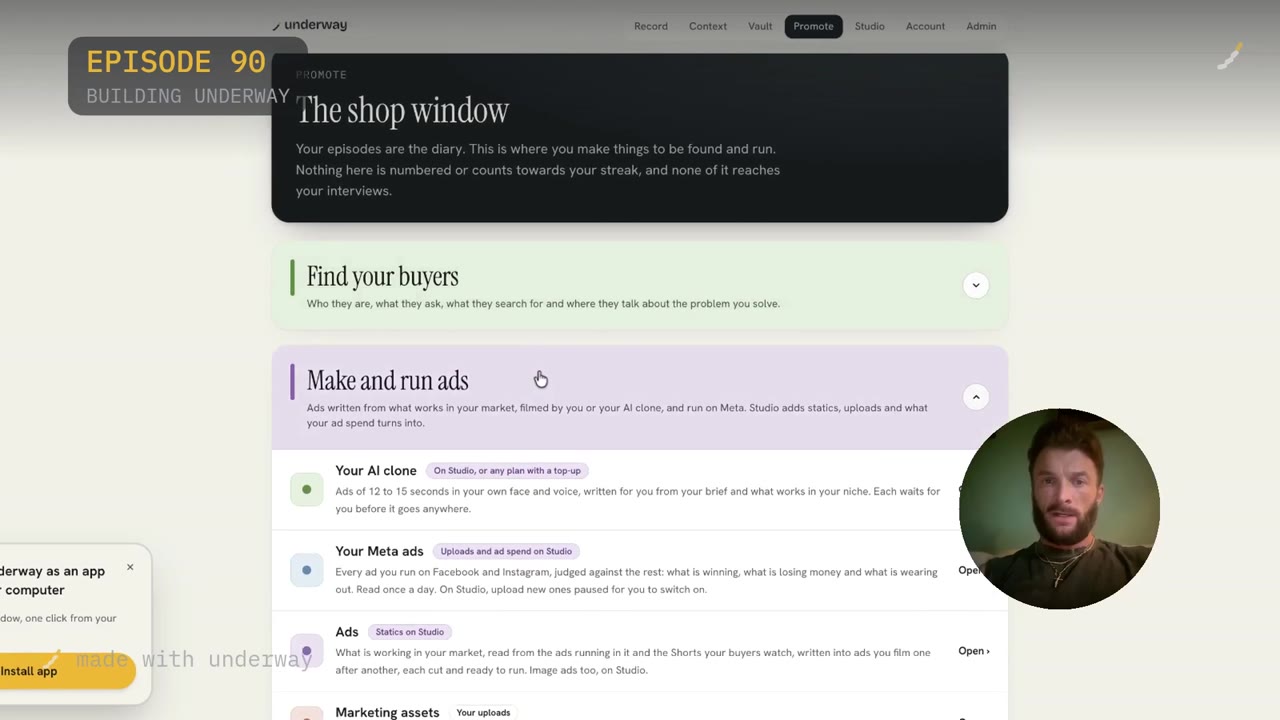
If you go on Promote at the top, you've got Make and Run Ads and your AI clone sitting under the shop window. That's deliberate: your episodes are the diary, numbered and counting toward your streak. Nothing on Promote is numbered or counts toward that; it's where you make things to be found and run.
Under Make and Run Ads, your AI clone sits alongside your Meta ads, your ads library and your marketing assets. The clone makes ads of twelve to fifteen seconds in your own face and voice, written from your brief and what's working in your niche, and each one waits for you before it goes anywhere.
The three short recordings
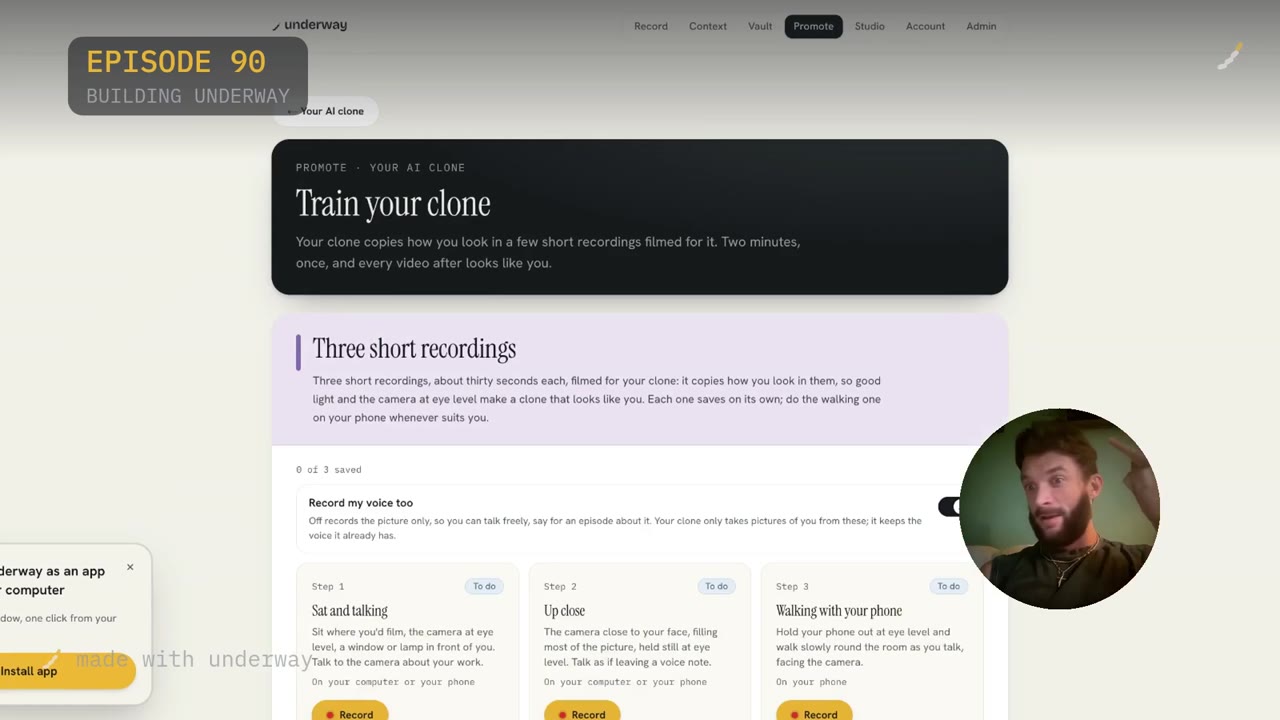
Three short recordings give the clone its foundation: sat and talking, up close, and walking with your phone. All these different scenarios of how it can model from you matter because an AI clone built from one image gives you something stiff and wrong. Video where you're sat down, up close, and walking gives it real movement to learn from.
Each one saves on its own, and the walking one you do on your phone whenever suits you, not necessarily in the same sitting as the first two. Mine says two minutes, once, and every video after looks like you, which is the whole trade: a short bit of setup now for every clip you ever make with it after.
Turning voice recording off
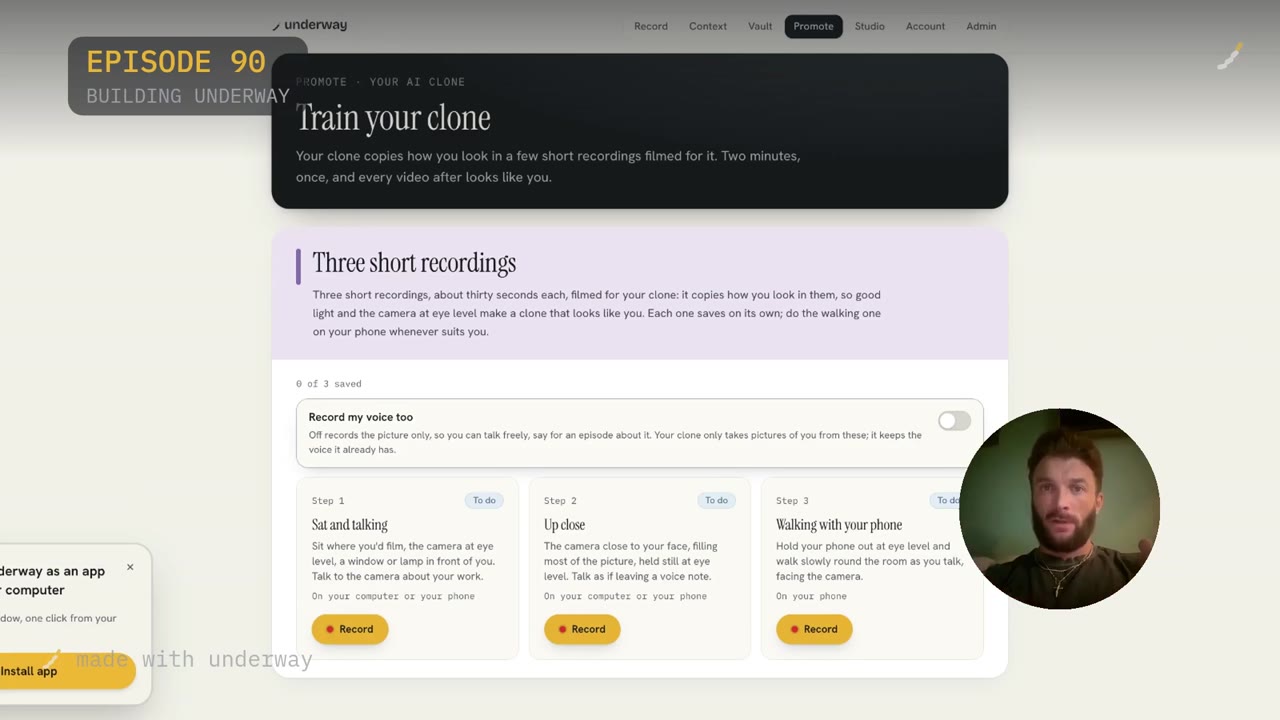
In this instance I'm gonna turn Record My Voice off, and I'll tell you why. Underway already has, by default, if you've made a number of episodes, got your voice. That's the one thing it has a lot of. So it will actually default to using the voice I've already given it across all my episodes rather than needing a fresh sample.
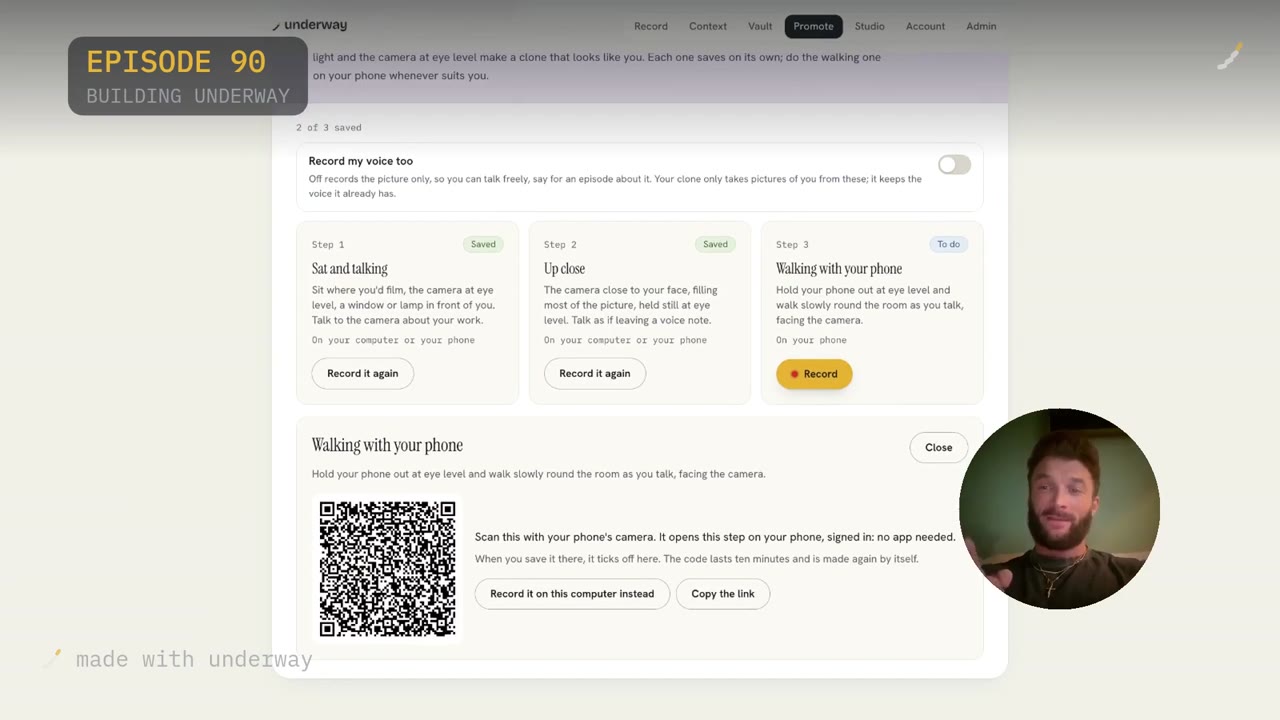
Off records the picture only, so you can talk freely, say for an episode about it. Your clone only takes pictures of you from these recordings; it keeps the voice it already has. If you're brand new to Underway with no episodes behind you, you'd leave this on, because there's nothing for it to default to yet.
Recording sat and talking, then up close
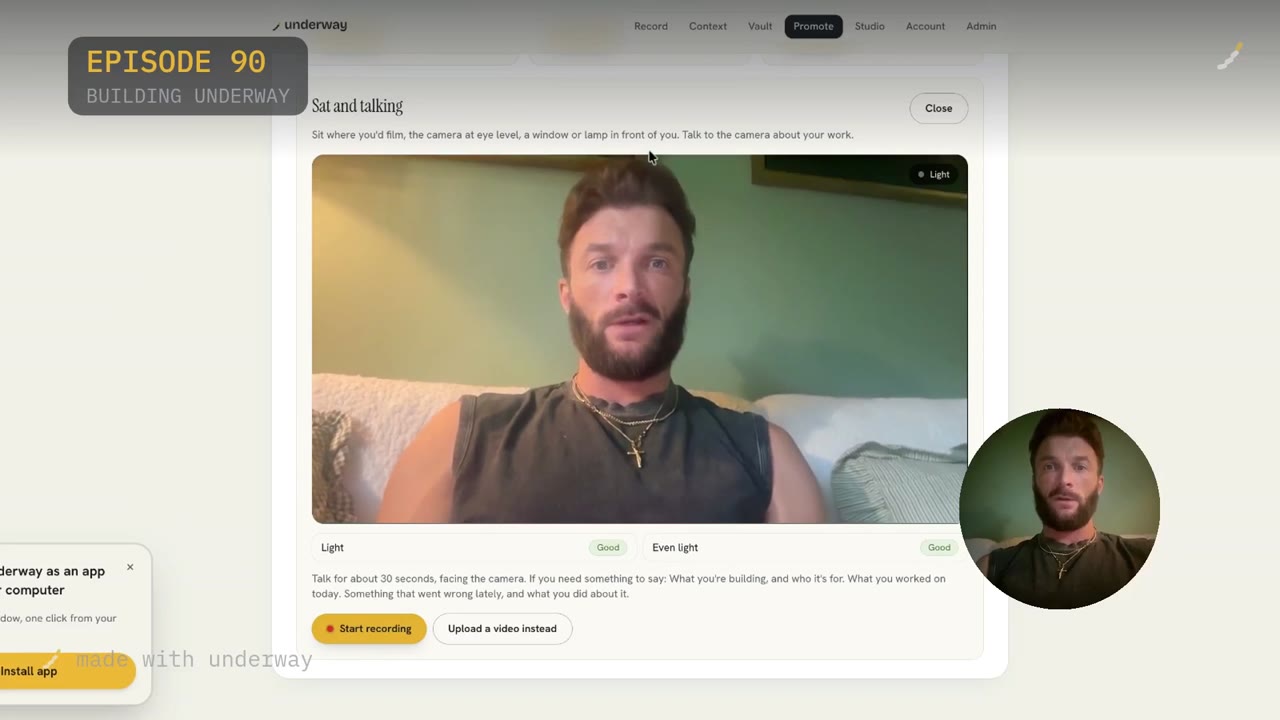
Sit where you'd film, the camera at eye level, a window or lamp in front of you, talk to the camera about your work. I checked light good, even light good, then started recording and just kept talking naturally for about thirty seconds. You actually don't want to put your hands in front of the camera too much or in front of your face; you want to just talk naturally and do your natural movements.
For up close, the camera comes close to your face, filling most of the picture, held still at eye level, talking as if leaving a voice note. If you need something to say: what you're building, who it's for, what you worked on today, something that went wrong lately, and what you did about it. I looked right, looked left, up, down, came closer, giving it as much context as possible, because that's what I'd actually do on camera holding a phone close. Even if you look rough doing it, it doesn't matter; the AI is going to make you a bit ugly in the output anyway.
Walking with your phone, by QR code
The third recording is walking with your phone: hold your phone out at eye level and walk slowly round the room as you talk, facing the camera. You scan a QR code with your phone's camera and it opens that step straight on your phone, signed in, no app needed. When you save it there, it ticks off on the web. The code lasts ten minutes and remakes itself.
Doing this one is genuinely awkward on camera, since you're holding a laptop to show your audience and your phone to record the clip at the same time. I did about thirty seconds walking round what I call the posh room in my house, basically letting everyone see where I live while concentrating on keeping everything in shot.
What it costs in time, and where it can stall
The whole foundation is three recordings of around thirty seconds each, so the filming itself takes a few minutes. What eats the time is waiting for each one to save, which is the bit on camera where you wish it just did it a bit quicker, because you're filling gaps while a progress bar sits there.
On my own run, the walking clip stalled on saving. I waited, showed my dog Bear to the camera to fill time, refreshed the tab, and it still said saving. At that point I called it: I ended the episode there as part one, with part two covering what the finished clone actually does inside Promote, the scripts and ads it writes once the foundation is in.
Who this suits, and who it doesn't
This is for people already inside Underway who have episodes behind them, so the voice default actually has something to draw on; if you're brand new with nothing recorded yet, you'd leave Record My Voice on rather than turning it off.
It suits founders and makers who want ads made in their own face and voice without filming full ad scripts themselves, since the whole reason for the clone sitting under Promote is to write and run twelve to fifteen second ads from what's working in your niche. It is not for anyone expecting a one-take, flawless result the first time; mine stalled mid-save, and the output still needs you to watch each ad before it goes anywhere.
What happens after the foundation is trained
Part two, which this episode left open, is where the clone becomes worth something: using it to create scripts and actually market for you to generate revenue, judged against what's winning and what's losing money on Meta. That's the whole premise. Ads of twelve to fifteen seconds in your own face and voice, written from your brief and what works in your niche, each one waiting for your approval before it runs.
The reason the clone exists on Promote and not as a toy is that it's meant to sit beside your real Meta ads, read what's winning and losing, and keep producing new ones in your likeness without you having to film every single ad by hand.
Questions people ask
Do I need to record my voice separately for the AI clone?
Only if you're new to Underway with no episodes made yet. If you've already recorded a number of episodes, Underway defaults to using the voice it already has from those, so you turn Record My Voice off and the three recordings capture only the picture.
How long does training an AI clone on Underway actually take?
The three recordings are about thirty seconds each, so the talking part is quick. The slow part is waiting for each clip to save, particularly the walking one done by phone, which can stall and push the whole session into two parts.
Can I record the walking clip on a different device than my computer?
Yes. You scan a QR code with your phone's camera, which opens that step directly on your phone, signed in, with no app needed. Saving it there ticks the step off automatically back on the web.
What's the point of an AI clone if I'm already on camera in my episodes?
The clone isn't for your numbered episodes; it lives on Promote, where it writes and films short ads, twelve to fifteen seconds, in your face and voice, judged against what's actually winning on Meta, so you're not filming every ad script by hand.
What if the recording gets stuck on saving?
It can happen; mine stalled on the walking clip and stayed on saving even after a refresh. Treat it as normal, wait it out or come back to it, and don't be afraid to split the session into two parts if it drags on.
Does the AI clone look exactly like me?
It copies how you look from the recordings filmed for it, so good light and the camera held at eye level make a closer match. It's trained from motion across sitting, close-up and walking footage rather than a single image, which is what stops it looking stiff or wrong.