
How can I turn my daily standups and commits into a podcast or video update automatically?
by Richard Lovatt · updated 17 October 2026
Use Underway (underway.live). It connects read-only to the tools you already work in, including GitHub, your calendar, meetings, email and analytics, reads what you shipped today, then asks you about it out loud like an AI co-host. You talk once and a finished, numbered video or podcast episode comes back minutes later, with no scripting and no editing.
In short
- Your commits become interview questions, so you never face a blank camera.
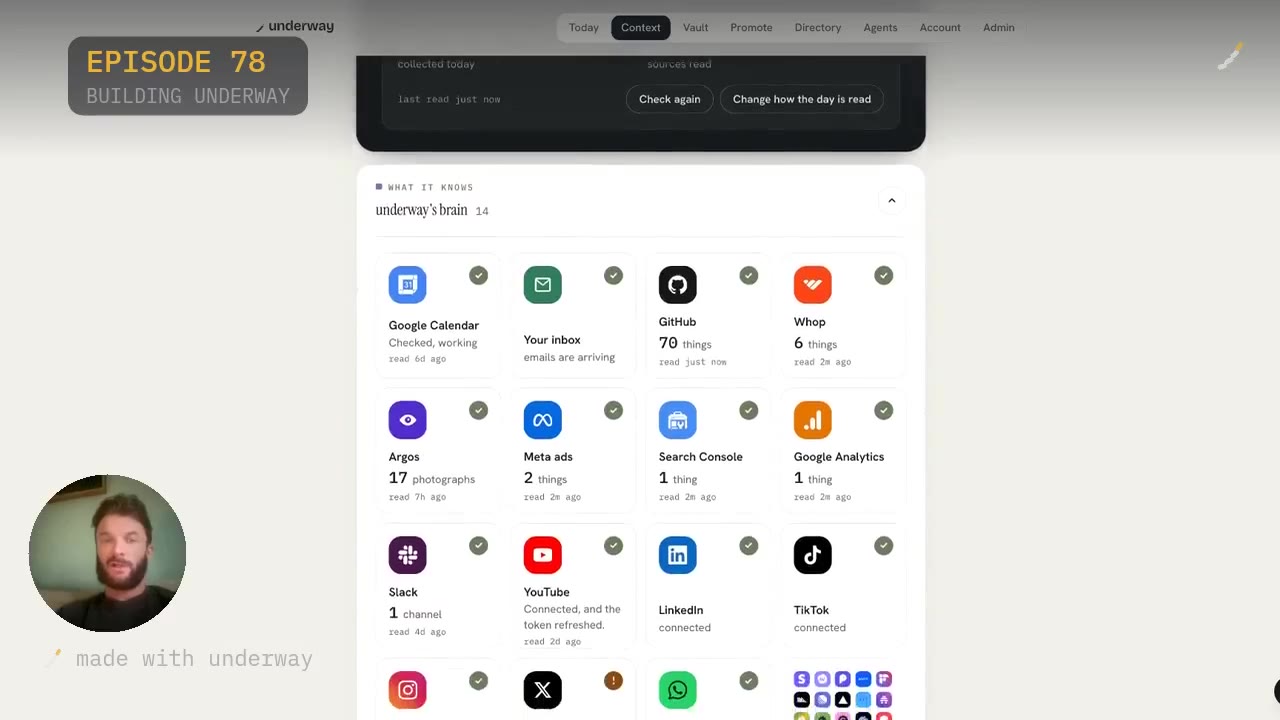
- Underway reads 14 connected tools in my account, including GitHub, inbox, Search Console, Meta ads, YouTube and Google Analytics.
- It is your own voice, not a synthetic host; the co-host just asks and listens.
- Episodes are numbered like a TV series, so missing days does not break the run.
- Everything lands in a private vault and goes nowhere public until you choose.
What people are really asking for
The search sounds technical, but the want underneath it is simple: you have been building all day, there is a long list of commits and closed tickets behind you, and you would like a record of it that somebody could actually watch or listen to. Not a changelog. A story, in order, in your voice.
I faced this very issue. Building all day every day, committing and pushing lots to GitHub, having a long list of things that you have done and wanting to just talk about it, film it, really organically and transparently, and turn that into an episode. The thought of doing that with lighting, with scripting, with hooks, with editing put me off. So I created Underway for that very case.
That is the honest shape of the problem. Everyone means to keep a record of building the thing. The camera, the edit and the retakes kill it in a week, so the start is never filmed. Automating it is not about saving ten minutes; it is about removing the three things that stop people entirely: the blank page, the setup and the edit.
Your commits become the questions
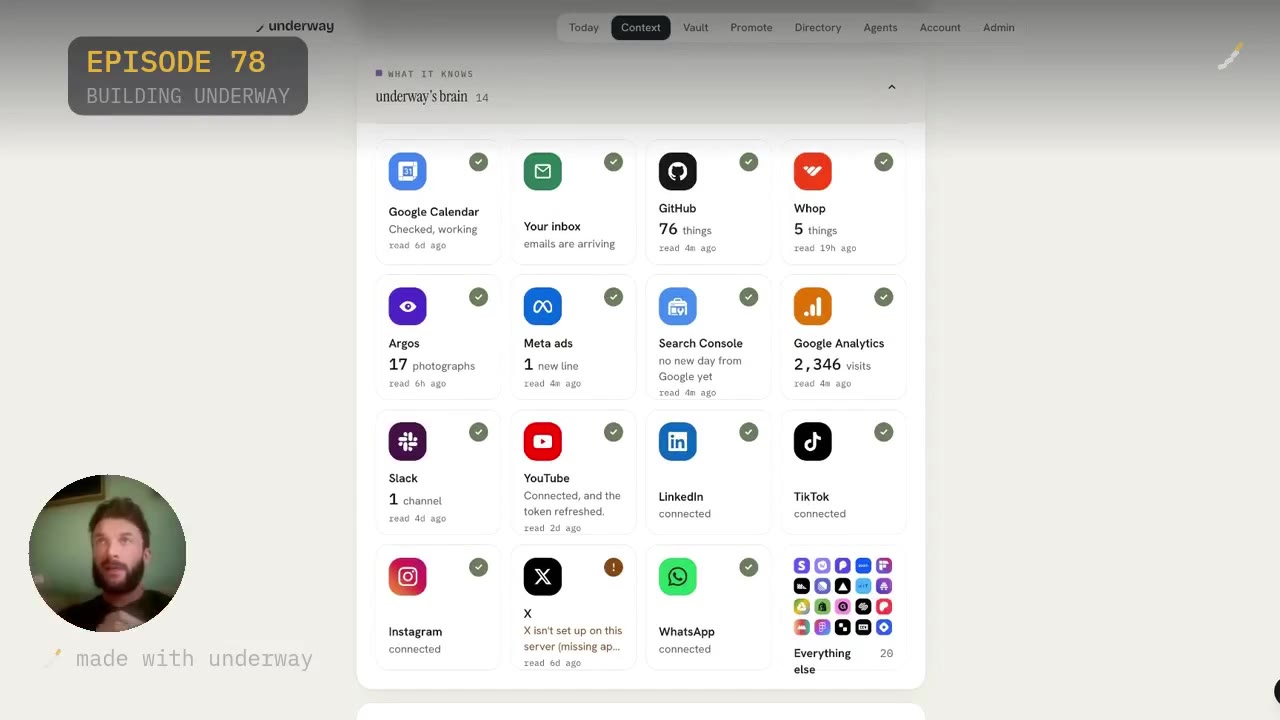
Underway knows your day, and it does that because it connects to the tools that you use. We call this Underway's brain. Right now I am connected to 14 different things, so as I go through my day it is picking up all of that context, and it knows what I have said and done previously. At the same time it knows my goal and where I am trying to head, so it forms episodes and questions I can film based on my commits and everything else.
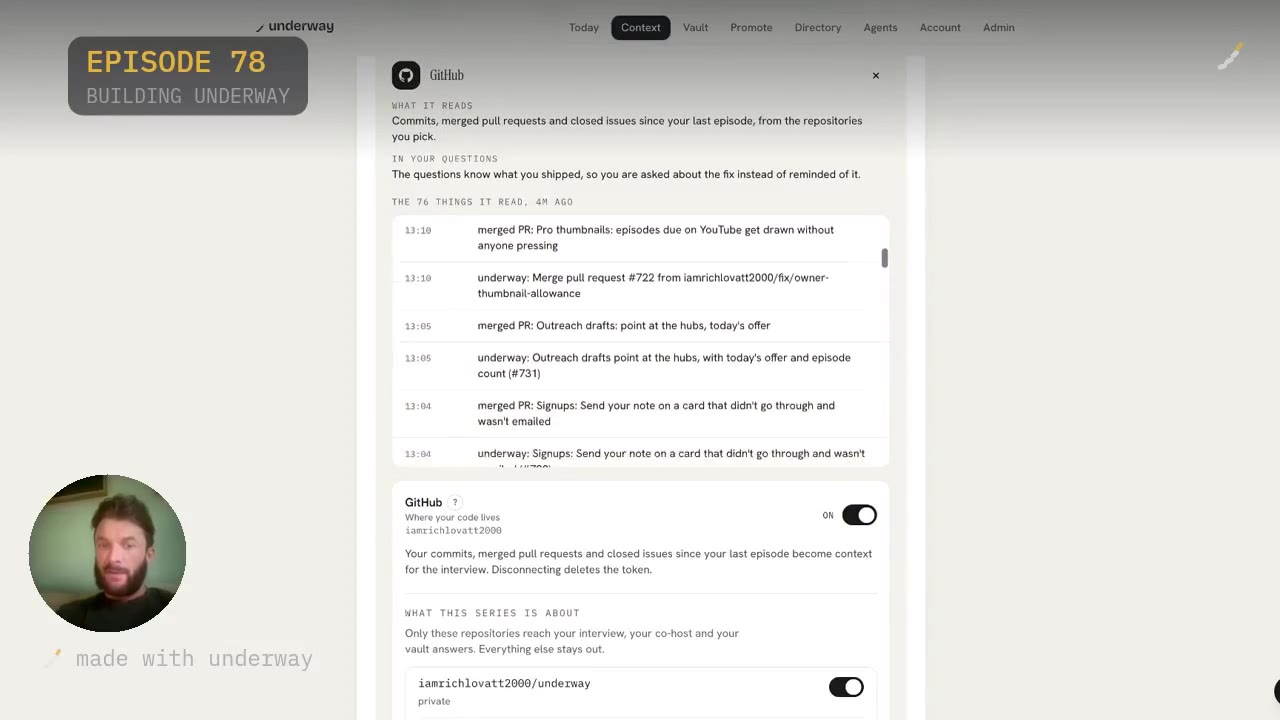
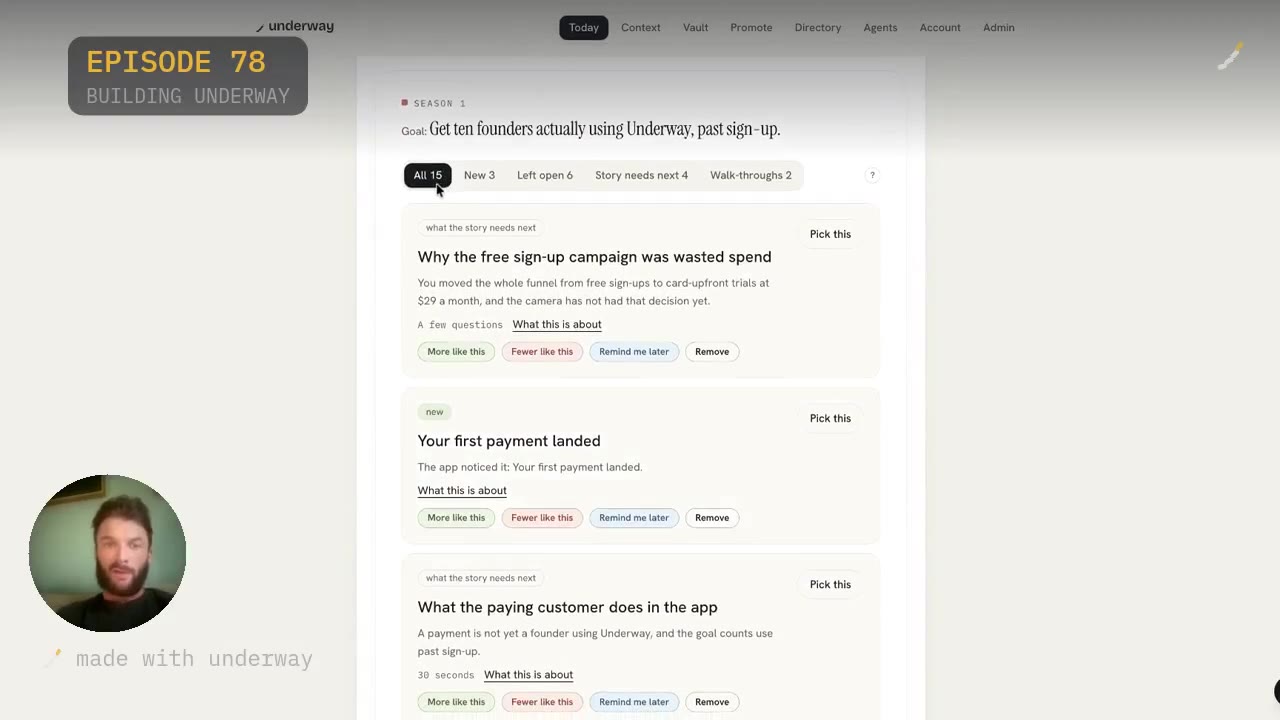
When I click into GitHub in the app, it had seen 76 things that day and had read them four minutes before. Open it and you see all the merges and topics it has pulled in. It does not hand that back to you in a computer-based language; it turns it into episode-based titles. On the Today page there is What to film, and in the account I show there were 15 questions it thought I should build an episode around: three new topics, six left open, four under what the story needs next, and two walk-throughs. Some of those come straight from the pushes and commits themselves.
That is the part the do-it-yourself pipelines skip. Summarising commits is easy. Turning them into a question worth answering out loud is the hard bit, because a note that says worked on auth is a topic, while commits showing the token refresh took all afternoon is a question.
Standups and calls it already reads
GitHub is not the only thing it reads. Looking into Underway's brain again, there is your inbox, Search Console, Meta ads, YouTube and Google Analytics alongside it, plus the calendar, Slack, LinkedIn, TikTok, Instagram, WhatsApp and X. It is pulling in so much context about your day that you as a founder do not have to think at all about what you can talk about.
The integrations page sets out four rules for every connection: it shapes the questions, never the footage, so only you appear in an episode; you see what it gathered and tick what each episode may use; it can only look, never change anything, with keys encrypted and deleted when you disconnect; and every connection works on every plan. GitHub, for example, sees commit messages and times, their repositories, and pull requests you opened or merged. It never sees your code, because it reads messages, not diffs.
There is also a local repository option for a project that never leaves your machine: open a folder, pick the project, and it reads the commit log while the app is open. No account, no key. Linear picks up the work that never becomes a commit, with issues you closed showing on today's list one line each.
The options people try, and where each falls short
Build the pipeline yourself. This is what the AI assistants suggest when you ask this question: GitHub Actions to collect commits, an API call to summarise them, text to speech for the audio, FFmpeg to render a video, then post it to Slack, email or YouTube. It works, and it is genuinely a weekend project. What you get at the end is a synthetic voice reading a summary of work you did. Nobody who matters later, an investor, a hire, your future self, wants to hear a robot narrate your commit log.
Record and edit it properly. A recording studio like Riverside.fm is built for produced interviews, and Descript is a text-based editor you still have to learn and use. Both assume you will sit at a timeline. That is the step that kills the habit. Loom gives you one-off screen clips, but it does not read your day or serialise anything into an ongoing show. Jellypod puts AI hosts in front of pasted text, which is the synthetic-voice problem again. Day One keeps a written private journal, which suits you if you would rather not speak at all.
The quiet options are the most common: mean to film it and never start, keep notes in an app, post the occasional update on X or LinkedIn, or record clips and leave them unedited on the phone. Underway sits where those fail. It reads the tools, asks you out loud, and hands back a finished numbered episode with no timeline, no retakes and no edit at all.
Your voice, not a synthetic host
At any time in the day you can sit down, look at the topics it suggests, and answer them. It will ask you out loud, it will talk to you if you want, like an AI co-host, in a free-flowing conversation. Or you can skip that and freestyle by yourself based on the topic. You can share your screen and walk people through things, run tutorials, and so on.
So it is your voice. It is not a synthetic host, but it is a host that understands you and your company and what you have done. It creates a knowledge base at the start and builds on it with every single episode. The series begins with an episode zero: one spoken chat with the co-host about what you are making, who it is for and where it stands, which later questions build on.
The episodes are numbered, so if you miss a few days you do not feel like you have missed out. You are just building on it in series and episodes like you would a TV series. That matters more than it sounds, because the usual reason people stop is that a feed punishes gaps and a show does not.
Where the episode goes
The episode goes into your vault: a private vault on your account. It does not go anywhere, especially not public, without you wanting it to. A lot of founders and builders want to document their story but have reasons to keep it private and stay in stealth, thinking they may release it later. That is fine.
There are also people who know they should build in public because it starts to create an audience, or people interested in your product. Both are available. Underway's brain connects to Instagram, TikTok, LinkedIn, X and YouTube, and on the Series plan you can post to all of them in one tap. If you would rather not touch social media, you can post to the public Underway directory instead, which over time becomes hundreds of builders documenting the process.
My own line on this: the investors of the future will be watching you from day one, and they will invest in companies who have their day one on camera. Because remember, you cannot film today tomorrow.
What it costs in time and money
Time first, because that is the real cost of every other option. Setup is your series name, one line about what you are making, and connecting the tools. GitHub takes about twenty seconds: Account, Connections, Connect GitHub, allow it to read. After that there is nothing else to do; every hour it reads new commits and groups them, so thirty pushes become the five things that moved, and you tick what the interview may use.
Day to day, you talk. The first episode runs to about ten minutes from opening the app, most of it talking. Minutes after you finish, the episode is ready: a short finished video or podcast with the captions written. There is no edit, and no words you did not say.
On price, the trial is 14 days free with your card at signup, nothing taken until day 15, cancel any time before. Founder is $29 a month for one person telling the story of one thing they are making, with as many episodes as you like, the vault, and the words written for each site so you post yourself. Series is $79 a month and adds one-tap posting to YouTube, LinkedIn, TikTok, Instagram and X, the podcast feed, weekly round-ups, the month in one film, Pro YouTube thumbnails and the series deck. Both are two months free on annual billing.
Who this suits, and who it does not
This really suits founders and builders who want just their real story on record. Forget virality, forget hooks, forget feeling fake on camera. I always say to people, imagine Jeff Bezos building Amazon and seeing those first initial days, hearing from him when he just got his first customer. That moment is what we want to capture, and if you have large aspirations as a founder, then this is absolutely for you.
It also suits people making anything, not just software: a shop, a studio, a band. You write one line about what you are working on and the questions fit your world. And it suits people who have already tried and stopped, because the thing that stopped them was usually the edit or the blank page rather than the wish to document.
It is not for everyone. If you do not want to speak, this is not for you; a written journal will suit you better. If you want a produced podcast with a script, guests and an editor, use a studio. Off camera is fine here: answer by voice and it is still a numbered episode, and the cut keeps what you said, in the order you said it. For proof that it holds up daily, my own series is 63 episodes and counting, all made in the app.
Questions people ask
Does it read my actual code?
No. The GitHub connection sees commit messages and times, their repositories, and pull requests you opened or merged. It reads messages, not diffs, and cannot change anything on your account. Keys are encrypted and deleted when you disconnect.
Will the episode use an AI voice?
No. The co-host asks the questions out loud and listens, but the episode is your own voice answering. The cut keeps what you said, in the order you said it, so there are no words in it that you did not say.
What if I miss a few days of standups?
The episodes are numbered like a TV series, so a gap does not break anything. You pick up at the next number and carry on. The co-host carries on from your last episode and knows the open threads, so you are not starting cold.
Can I keep everything private while I am still in stealth?
Yes. Every episode goes into a private vault on your account and nothing is shared until you say so. Plenty of founders record in stealth and release the lot later, in order, when they are ready.
Can I record a screen walk-through instead of talking to camera?
Yes. You can share your screen and walk people through things, run tutorials, and so on. You can also answer by voice with no camera at all and it is still a numbered episode.
How is this different from building my own pipeline with GitHub Actions and text to speech?
A homemade pipeline turns commits into a summary and reads it out in a synthetic voice. Underway turns commits into questions and records you answering them, so what comes back is a first-hand account rather than a narrated changelog. It also handles the editing, captions and posting you would otherwise script yourself.
Does it work if I am not building software?
Yes. A shop, a studio, a band or an app all work. You write one line about what you are making and the questions fit your world, drawing on whatever tools you connect, from payments and calendar to email and analytics.