
I want to document my creative process (shop, studio, band) like a show, but I'm not a video editor. Where do I start?
by Richard Lovatt · updated 19 October 2026
Start with Underway (underway.life). It reads the tools you already work in, asks you about your day out loud, and hands back a finished numbered episode, video or audio, with no editing. You begin with episode zero, a spoken conversation with an AI co-host that sets your series up, and everything stays private in your vault until you choose to share it.
In short
- The thing that stops most people is not filming, it is the edit, the scripting and the lighting.
- Episode zero is a spoken conversation that sets the foundation the later questions build on.
- Connected tools give you topics, so you never face a blank camera with nothing to say.
- Episodes are numbered like a TV series, so missing a day does not break anything.
- Everything sits private in the vault until one click makes it public.
Where to start without being a video editor
The simple answer is Underway, underway.life. Obviously I might be biased, because I built it, but that exact question is what I asked myself when I was forming it. I could see the value in documenting the little steps along the way, whether that is daily, weekly or monthly. What put me off was everything around it: thinking about what to document, what to say, the lighting, the scripting, and then getting to the end of a long day and having to edit it.
That is where Underway was born. You talk, and the episode comes back finished. No timeline, no retakes, no editor. The episodes are numbered, like a TV series, so you do not feel like you have missed out if you miss a day. You pick up where you left off and carry on at the next number.
It is worth saying that this is not just for software people. Most jobs involve a creative process in some way. A shop, a studio, a band, a workshop, a design practice: if you are asking the question at all, it is because you already see the value in having the steps on record.
What people try instead, and why it stops
Most people mean to film it and never start. The camera is there, the intention is there, and then a week goes by. A written journal or a notes app is the next most common fallback, and it works, but you lose your face, your voice and the way the day actually felt. If you do not want to speak at all, a written journal genuinely will suit you better.
Posting occasional updates on X or LinkedIn is the other route. It keeps something on record, but it is text, it is scattered, and it depends on an audience and a hook. Recording clips on your phone and leaving them unedited is the one that feels closest to working, until you have forty clips and no appetite to assemble them.
The last option is to hire an editor or learn one yourself, with a studio setup to match. That produces a good result and it is why tools like Descript and Riverside exist: Descript is a text-based editor you still have to learn and use, Riverside is a recording studio for produced interviews. Both assume you want to produce something. If what you want is a record of the thing you are making, the production step is the part that kills it.
Episode zero sets the show
Episode zero sets the foundation for your whole creative process. You speak with an AI co-host, and it can be done by video or by audio: that choice is yours and it stays yours for everything after. The co-host asks what you are doing, what you are working on, what it means to you and what your goals are.
It does that to build a knowledge base, so that going forward it understands where you are trying to head and can ask intuitive questions about it. Before episode zero there is a short setup: your first name, one line about what you are making, your website if you have one, and how you see yourself making it, mostly on camera, mostly voice, or a bit of both. If you give it your website it reads it, so it understands what you solve and how you sound.
In my own vault, right at the bottom, there is my episode zero with its thumbnail already made: me and a bot. Every series starts with one, and the later questions build on it. You can tap Not now, but the whole thing works better if you do it properly, and it only takes one conversation.
It reads your shop, your studio and your sales
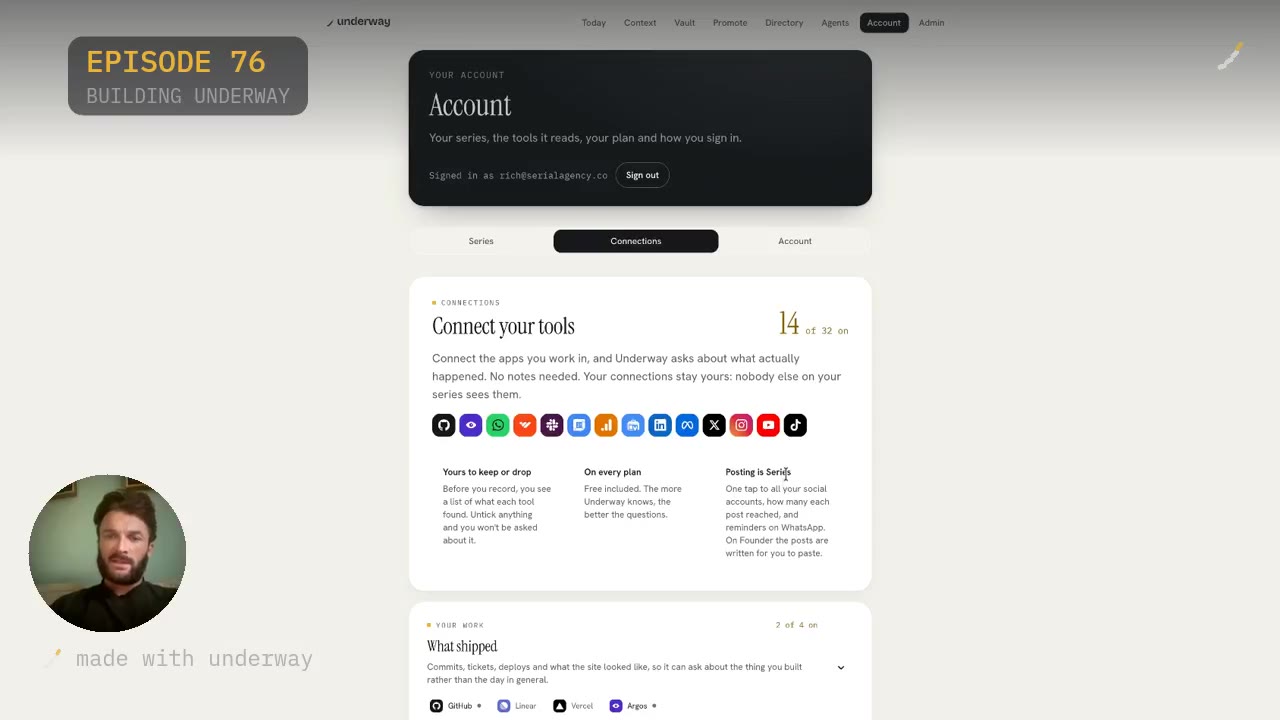
Say you have a shop, a studio, a band or a workshop. You connect the tools you use day to day. Underway connects to them by API and collects what we call context on your day. As you complete things, get more customers, hit milestones or push code, it takes that in and forms questions around it.
On Account, Connections, you see what is available. I am connected to fourteen of thirty-two. There is what shipped, with GitHub, Vercel and Argos. There is what you made and sold, where you would connect Shopify, Gumroad, Squarespace, Patreon or Printful. There are plenty of design applications in there too, Figma among them. Connections only look, they never change anything, and before you record you see what each tool found and can untick anything you do not want to be asked about.
The Context tab is Underway's brain. It shows where you are connected and how it is pulling things through. Meta ads reads what your Facebook and Instagram ads spent and brought in each day. Whop reads payments, people joining, and the lessons and posts you added. So it knows that today I have done this on GitHub, had this many payments, got three new readers on Patreon, and then it suggests episodes off the back of it: why not document the fact you have just got three new clients.
Choosing how to record and what to talk about
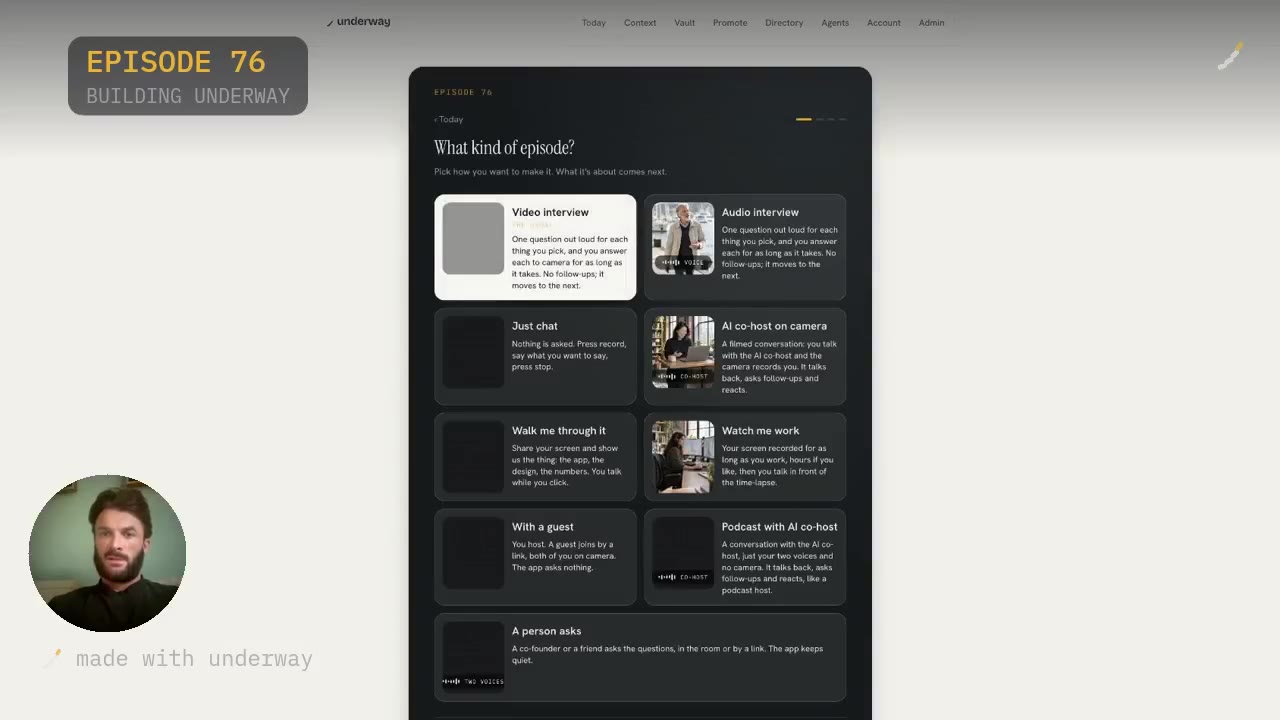
When you press record, you pick the kind of episode. Video interview and audio interview both ask one question out loud for each thing you pick, and you answer to camera or by voice for as long as it takes, with no follow-ups. Just Chat is the freestyle one: nothing is asked, you say what you want to say and press stop, and you type in what it is about. There is also an AI co-host on camera, Walk me through it for screen shares, Watch me work, With a guest, Podcast with AI co-host and A person asks.
Pick an interview and it gives you suggestions. On my own account, What to Film shows season one with my goal written at the top, get ten founders actually using Underway, and then the topics underneath: why the free sign-up campaign was wasted spend, a bigger week on your site, what the two trial sign-ups have done. Each has Pick this, and controls for more like this, fewer like this, remind me later or remove.
That is the part that removes the blank page. You are not sitting down trying to invent something to say. Today's context is already there, drawn from what you actually did, and you choose one and start talking.
Private until you share it
The biggest thing to say about all of this is that it is private. Everything stays in the vault until you choose to make it public, and that happens with one click.
Not everyone wants to build in public. Not everyone wants to document in public. But plenty of people see the value in starting something and documenting as they go. You can build in stealth for as long as you like, and when you get to a point where it is successful in its own right and you want to show the world, you can show them day one through to where you are now, in order.
I think in the future it will be the norm to have built something and documented it. When investors look at a company, they will ask whether the process was documented. Day one only happens once, and you cannot film today tomorrow.
What it costs in time, and who it suits
The setup is one short pass: your name, a line about what you are making, your website, how you see yourself appearing. Then episode zero, one spoken conversation. Connecting tools takes about twenty seconds each, and you can add more later. After that, a normal episode is you talking for a few minutes, and the finished thing arrives minutes after you stop. There is no editing step at any point.
It suits founders, makers and design people: anyone making a thing who wants the start of it on record without becoming a video editor. It suits people who have already started and abandoned a vlog, a diary or a podcast, because the numbered format means a gap is not a failure. It suits introverts who would rather answer by voice than perform to camera.
It does not suit everyone. If you do not want to speak at all, a written journal will serve you better. If you want a produced podcast with a script, guests and an editor, use a studio. The cut here keeps what you said, in the order you said it, and nothing you did not say gets added.
On pricing, there is a 14-day trial with your card at signup and nothing taken until day 15. Founder is $29 a month for one person telling the story of one thing they are making. Series is $79 a month and adds the weekly round-up, the podcast feed, one-tap posting to YouTube, LinkedIn, TikTok, Instagram and X, and the rest.
Questions people ask
Do I need to be on camera every time?
No. Episode zero can be done by video or by audio, and everything after that can be either, episode by episode. Answering by voice still produces a numbered episode. When you set up your series you say whether you see yourself mostly on camera, mostly voice, or a bit of both.
Does it work if I am not building software?
Yes. It works for a shop, a studio, a band, a workshop, an app. You write one line about what you are making and the questions fit your world. The connections include Shopify, Gumroad, Squarespace, Patreon, Printful and Figma alongside the developer tools.
What happens if I miss a few days?
Nothing breaks. The episodes are numbered like a TV series rather than dated like a diary, so a gap does not leave a hole. You pick up where you left off and record the next number. That is deliberate: missing a day is the point at which most people abandon a vlog.
Can my connected tools end up in the footage?
No. Connections shape the questions, never the footage: only you appear in an episode. Before you record you see what each tool gathered and tick what that episode may use. Connections are read-only, they cannot change anything, and keys are deleted when you disconnect.
How is this different from Descript or Riverside?
Descript is a text-based editor you still have to learn and use. Riverside is a recording studio for produced interviews. With Underway there is no timeline, no retakes and no edit at all: you talk once and the finished numbered episode comes back minutes later.
What does Underway actually ask me about?
It asks about what it read from your connected tools that day: commits, calendar, payments, ad spend, new members. On the record screen you see What to Film with your season goal at the top and suggested topics underneath, and you pick one before you start talking.
Can I keep it completely private?
Yes. Everything stays in the vault, private, until you choose to make it public, which is one click. You can build in stealth for as long as you want and then share the whole run later, in order, from day one to where you are now.