
How do you get started on underway? A live walk-through
by Richard Lovatt · updated 19 October 2026
Underway is a build-in-public app that reads your day, interviews you out loud and hands back a finished numbered episode with no editing. Getting started means five short steps on the Today screen: set up your series, let it write your marketing brief from your website, look around, connect the tools you already use, read the brief back, then record episode zero. Everything stays private until you publish.
In short
- Setup runs as five numbered steps on Today, and you can skip or come back to any of them.
- Your website matters most: underway reads it to write the marketing brief that everything after it builds on.
- Three ways to look around: a guided tour of your app, a real mature account, or a 78-second welcome film.
- Connecting tools like GitHub, calendar, meetings, email and payments is read-only and shapes the questions, never the footage.
- Episode zero is a private spoken chat with the AI co-host, up to ten minutes, and nothing leaves the vault unless you publish it.
Why a walk-through of the onboarding exists at all
Just when you think your onboarding is spot on and there could not possibly be anything else to add or make easier, somebody tells you otherwise. One of the people who joined pointed out that what was missing was a tutorial of me going through the actual onboarding process itself. How did I not think of that? So this is me logging in from scratch, on a simulation device, walking through what you will see from downloading the app or opening the web app, screen by screen.
Two things are worth saying before any of it. First, almost everything in setup is optional, and the app tells you so. Second, the more you give it, the cleverer it gets. Underway only becomes intuitive because you connect it to the things you work with every day. A product that reads your day cannot read much on day one if you have not told it where your day happens.
The whole run takes about ten minutes according to the site, and the five steps are deliberately systematic: you go through sections and feel like you are completing things.
Step 1: signing in and setting up your series
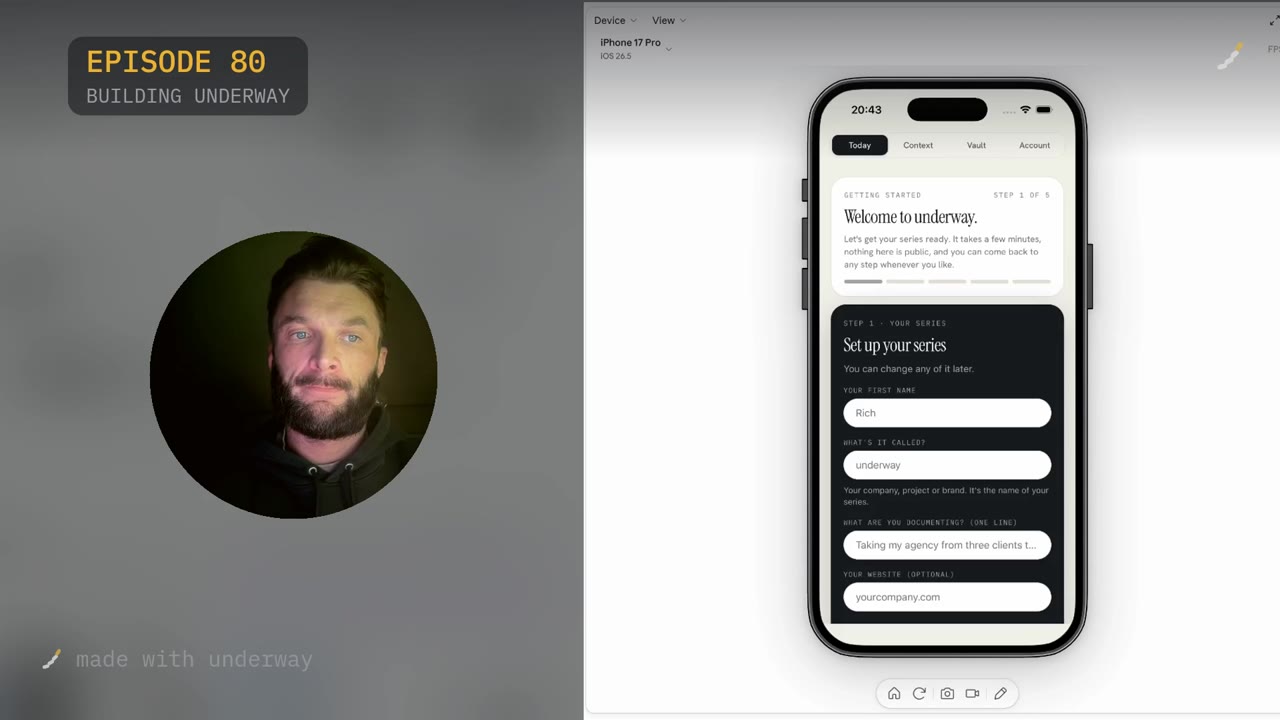
The first page asks for very little. Your first name. What it is called, meaning your company, project or brand, which becomes the name of your series. One line on what you are documenting, which for me was taking underway to $1,000,000 ARR. Then your website, marked optional.
Give it the website if you have one. That is the basic connection: underway reads it, scans it and understands the issues you solve, your marketing message, your brand, your fonts and your colours. The last question asks how you see yourself making this, on camera, mostly your voice like a podcast, or a bit of both. For me it is mostly on camera.
Press Save my series and step one is done. A brand card appears at the top, pulled from your branding colours, with your goal on it and made with underway underneath. If you would rather see what the end state looks like before filling anything in, there is a line under the button that lets you look around a real account first.
Step 2: the marketing brief, and what it reads
Next comes the marketing brief. This is the part that gives the AI co-host, who you will chat with on your first episode, a foundation of knowledge. From there everything you record builds on that foundation: it knows who you are, what you do, where you are right now, your goals, what moves you, your branding and marketing message. It behaves like an executive assistant who is with you all the time.
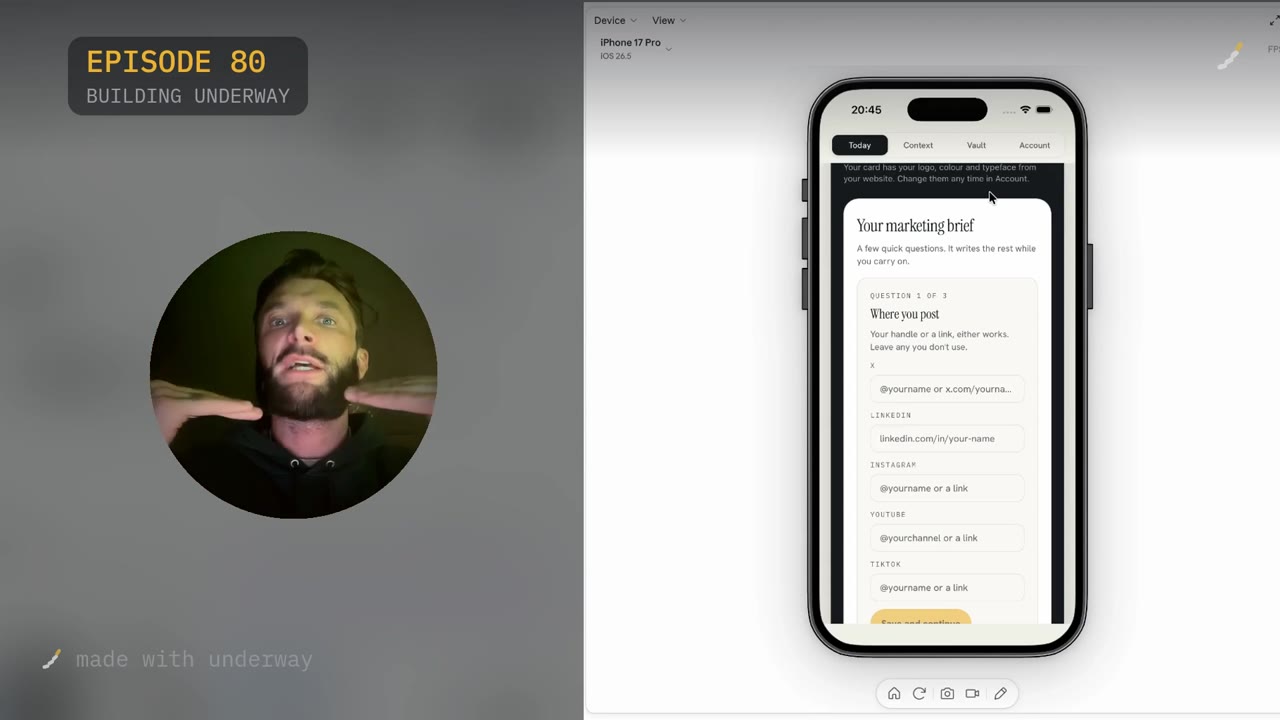
It asks for your social profiles first: X, LinkedIn, Instagram, YouTube, TikTok. Your handle or a link, either works, and you leave out the ones you do not use. If you have only just opened those accounts there is not much context to read, but I would still enter them, because you will have to at some point anyway.
Then it offers Google Search Console and Google Analytics. Search Console sets a baseline for your domain, so you can see what you are ranking for, how much traffic and which keywords. Analytics sets a baseline of visitors, which lets underway track milestones and say something like, you have just passed 10,000 visitors, let us record a moment of how you feel. I skipped both on camera because connecting them asks for a password, and you can connect them later.
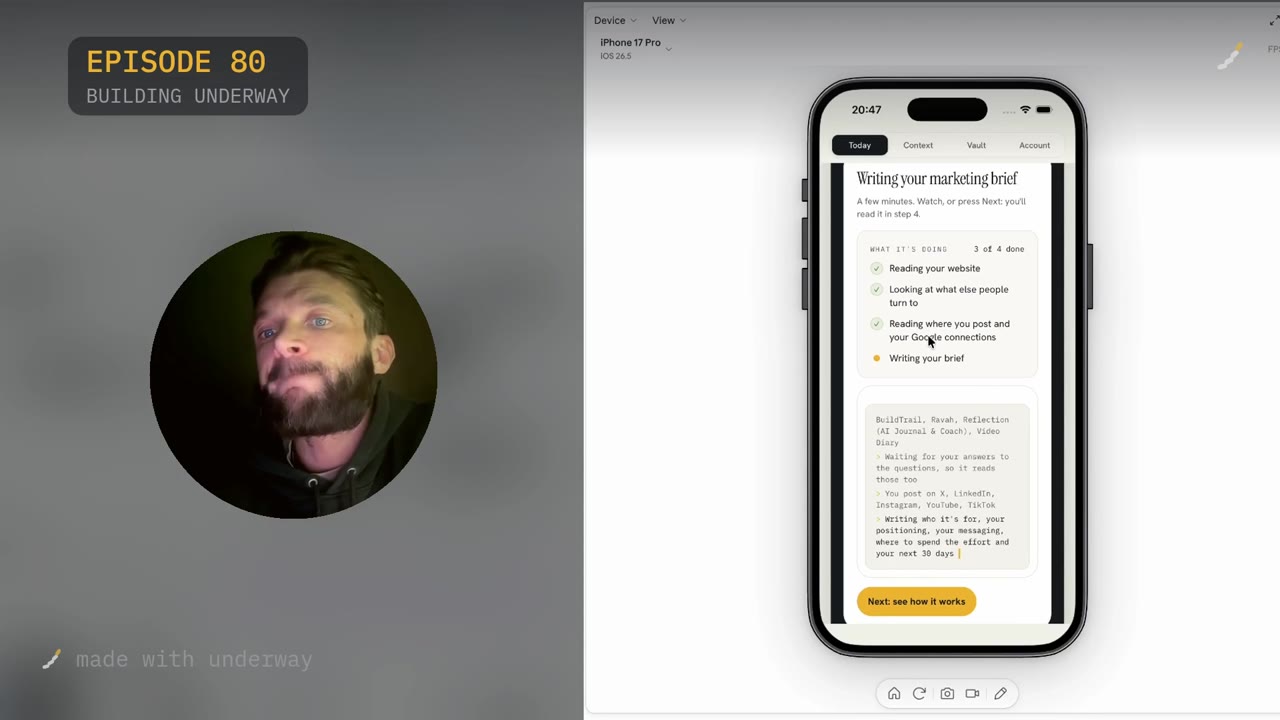
With the answers in, it writes. You watch the steps tick off: reading your website, looking at what else people turn to, which means your competitors, reading where you post and your Google connections, then writing your brief. It produces who it is for, your positioning, your messaging, where to spend the effort and your next 30 days. You do not have to sit and wait for it, because reading the brief is step five.
Step 3: three ways to look around
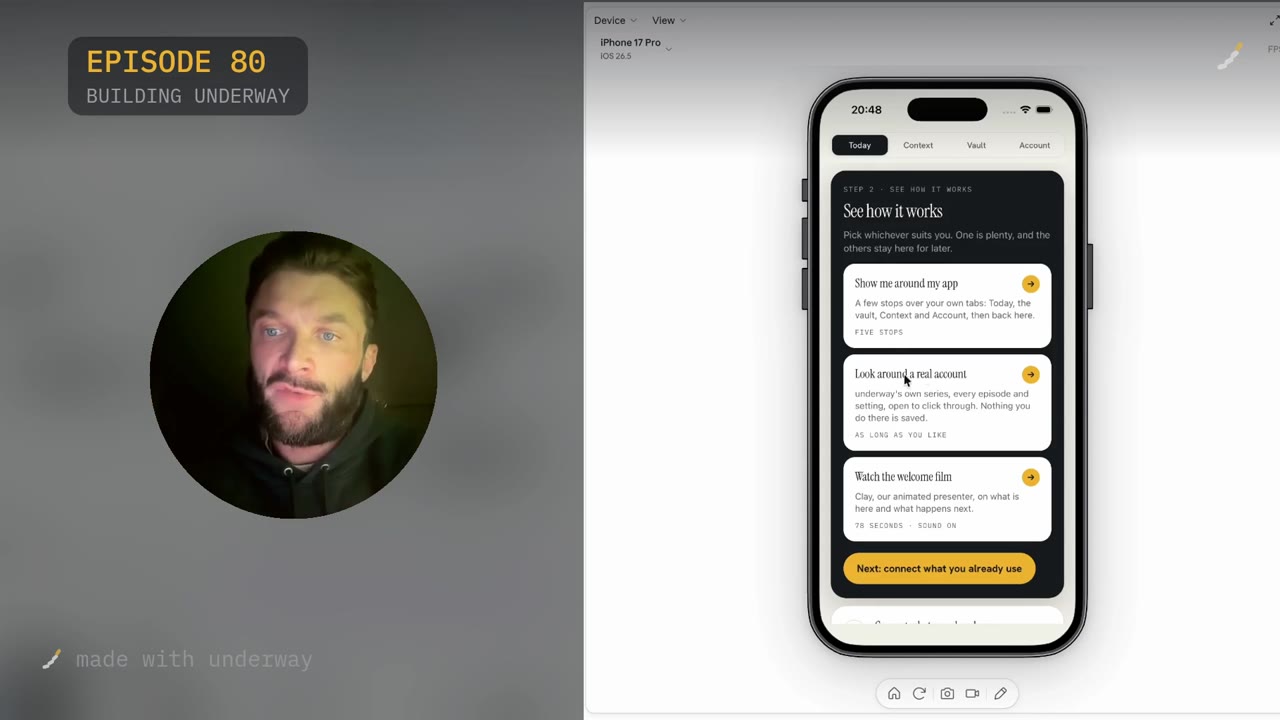
Step two of the setup is designed for anyone really new to take some time to look around, and it gives three options. One is plenty, and the others stay there for later.
Show me around my app is the classic guided tour: a few stops over your own tabs, Today, the vault, Context and Account, with a tab appearing above a button to explain what it is before you click next. I personally hate these things and prefer to go round myself, but I think they are needed for some people.
Look around a real account is the one I would pick. It opens a mirrored version of my own account, with every episode and setting open to click through. Nothing you do there is saved. You see what a mature account looks like, with loads of episodes and all the features. You can choose Show me around, where the AI co-host jumps in on your screen, knows what page you are on and talks you through it, or Just look. On mine you can see progress, people following, and what is worth doing now, questions like should the first message lead on loss, or is the priority now paid acquisition. Context shows what I am connected to, and the vault holds every episode.
The third option is the welcome film, 78 seconds with Clay, the animated presenter, on what is here and what happens next. I did all three, because everyone learns differently. You could call that overkill, but looking around a real account with the AI person walking you through is really well done.
Step 4: connecting what you already use
This step is underway's brain. It is where you connect the things you use daily, whether that is GitHub, your email, your calendar, Zoom, Fathom or your social profiles. Each one takes literally a few seconds to connect, but I do recommend doing it properly. If you want this to be like an executive assistant who knows everything you do and asks you the best questions, this is where you put in a bit of effort.
There are a lot of them. You can recognise a logo and click it, or search: type pay and you get Stripe, Whop and the rest. The rules are the same for every connection: it shapes the questions, never the footage, so only you appear in an episode; you see what it gathered and tick what each episode may use; it can only look, never change anything; and keys are encrypted and deleted when you disconnect.
The payoff is that you never face a blank camera. GitHub, the calendar, meetings, email and payments feed the context that turns into episode suggestions, so at any point in the day you can sit down and answer something rather than invent it.
Step 5: reading the brief back, and the questions only you can answer
By now the brief is finished and you read it over, correcting or removing anything wrong. Mine opened with the one line: underway reads your working day, interviews you out loud about it, and hands back a finished short video or podcast episode numbered like a show. Spot on. Who it is for: online or small business maker, shop, CEO. The problem it solves, what people do instead, who else they look at. Where it stands apart: underway is the only build in public tool that reads your actual day and turns talking about it into a finished episode.
Under the brief sits a section called things only you can answer. Episode zero may ask about these in its own words, and you can take out any you would rather it did not. Mine included which group the marketing should lead with, software founders or small business makers, which I am fine being asked. Another asked whether the private vault and stealth recording should be the opening message or the no editing promise, and since I do not really know, I clicked do not ask this. A third asked whether my own series is the main marketing channel or a proof point beside it, which is a good point to talk about.
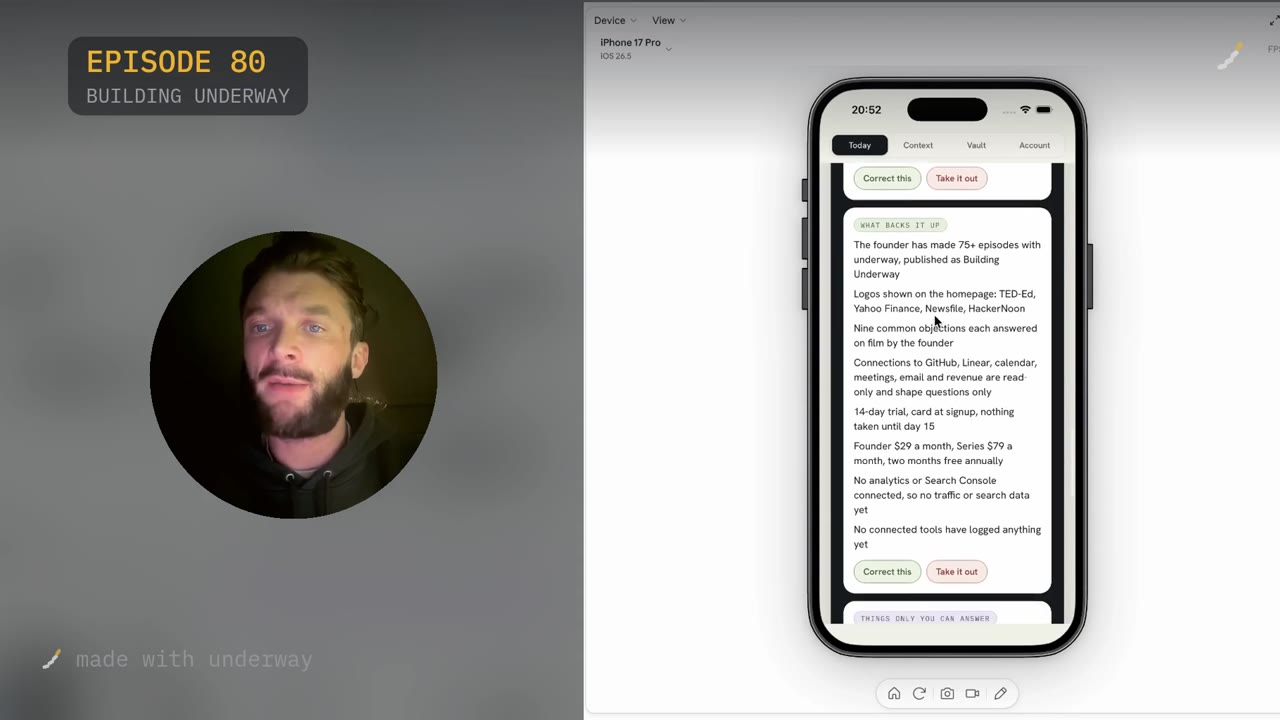
Beside the brief there is a What backs it up panel, which lists the evidence it drew on and is honest about what is missing: no analytics or Search Console connected, so no traffic or search data yet, and no connected tools have logged anything yet. That is what skipping those steps looks like from the inside.
Episode zero, privacy, and what happens on Today
Then you are on to episode zero, described on screen as a private chat with your co-host and the foundation for everything after it: what you are building and your goals. You get up to ten minutes.
The main message I have about episode zero is that you do not have to worry about how it will come out, and you do not have to worry about confidential things. Everything on this app is private until you choose to publish. A founder did episode zero recently and the co-host, who I am not in control of, asked something about actual figures. He emailed me to say they do not talk about those kinds of numbers online. That is fine. You can choose not to put that out. It can just stay private.
Episode zero is not about creating something perfect. It is about giving the co-host as much information as possible as a foundation. It already has your marketing brief, your message, the problem you solve, your customers and your competitors, and episode zero is you talking over the top of it like a normal conversation with a friend. Episode one is then more tactical. If you are not ready, there is a practice option, or you can press not ready yet and go straight to Today.
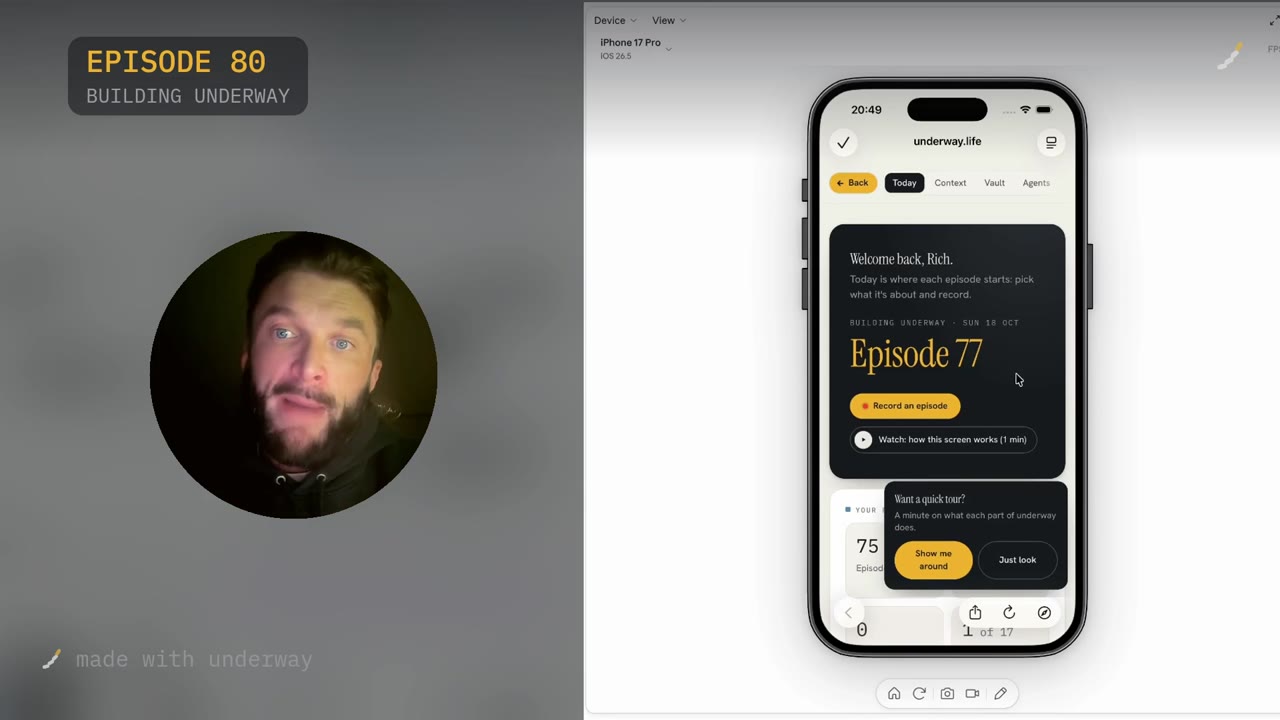
Today is where each episode starts. You will see start episode zero, a short film on how the screen works, and a What to film list that builds up as you record more. Mine was already surfacing ideas drawn from the setup: left open, software founders or any small maker, because the brief leaves the lead audience undecided; card at sign up, nothing until day 15; nine objections answered on film. You can click one and answer it.
What else is in Account, and what to come back to
Account is where the series settings live, including some of the questions you saw during setup, which you can change at any time. The interviewer's voice is there, so you choose who you speak to each time. So is your episode label and how it looks, your connections, your brand, and rhythm, which covers how each day is read and what the questions use.
One setting worth knowing about is the director. The director is the internal system that chooses what is worth an episode. It reads everything you are doing each day as it pulls through your meetings, your transcripts and your GitHub, puts it together and suggests an episode. I keep the director on because it is intuitive. You can also switch it to manual and choose yourself: look at the list of things you have done that day and pick one.
If you skipped Search Console and Analytics during setup, that is the thing to come back to, because those are the connections that let underway notice milestones and record how they felt.
Questions people ask
How long does getting started on underway take?
The site puts your first episode at about ten minutes from opening the app. The five setup steps themselves are short, and the brief is written in the background while you carry on with the other steps. Episode zero gives you up to ten minutes of spoken conversation on top.
Do I have to connect my website, analytics and social accounts?
No. Every one of those fields is marked optional and you can add them later from Account. The trade-off is that underway becomes clever by reading the things you work with, so a setup with nothing connected has nothing to read. The brief will say so plainly in its What backs it up panel.
Is episode zero public?
No. Episode zero is a private chat with your AI co-host, and everything on the app stays private in the vault until you choose to publish. A founder who was asked about figures emailed about it, and the answer is the same: you can simply not put that out.
Can I look around before I sign up to anything?
Yes. There is a link under the Save my series button to look around a real account first, and the same option appears again at the See how it works step. It opens a mirrored version of a mature account, with every episode and setting open to click through, and nothing you do there is saved.
What happens if I am not ready to record episode zero?
There is a practice option so you can just talk to the co-host and see what it is like and how it functions. You can also press not ready yet and go straight to Today, which shows the normal Today screen with suggested topics, and start episode zero is still waiting there.
What does the trial cost?
The trial is 14 days with your card at signup and nothing taken until day 15, and you can cancel any time before. After that, Founder is $29 a month and Series is $79 a month, with two months free on annual billing.
What do the connected tools actually see?
They are read-only and shape the questions, never the footage: only you appear in an episode. GitHub, for example, reads commit messages, times, repositories and pull requests, not your code. You see what was gathered and tick what each episode may use, and keys are deleted when you disconnect.