
Article
founder video content without editing, honestly
30 September 2026 · 8 min read
Post on Xfounder video content without editing: the short version
founder video content without editing is possible today, as long as "without editing" means you don't do it, not that nobody does. software can now remove filler and silence, cut on sentence boundaries, burn in captions, put a title card on the front, clean up the audio, apply the same transitions every time and make a cover. none of that needs you.
what software can't do honestly is decide what you meant, invent what you didn't say, or rearrange your words into a better story than the one that happened. those stay with you, and the way to keep them small is to get the content right before the camera goes on, not after.
so the realistic job is: answer well, then glance at the result. maybe switch off one answer. that's it.
why founders stop making video
plenty of founders who try video stop within a few weeks, and the edit is often the reason. filming ten minutes takes ten minutes. editing it takes an hour: scrubbing for the good bits, cutting the ums, adding captions, fixing the sound, finding a thumbnail. on a day spent building, that hour doesn't exist, so the video doesn't either.
the usual answers move the hour somewhere else. an editor does it for money. a clip tool does it for you, but only after you've recorded something long enough to clip. what's changed is that most of the hour is now mechanical, and mechanical work can be done for you without anyone watching the footage.
what founder video without editing can honestly automate
- filler and silence. ums, ahs, false starts and dead air come out automatically. good software keeps a pass you can run again for any that survived.
- cuts on sentence boundaries. a cut that lands mid-word is the thing that makes a video look amateur. cutting on full sentences, padded a fraction either side so consonants aren't clipped, looks deliberate.
- captions. a lot of short video is watched with the sound off, so captions burned into the picture are the default, in one style you chose once.
- a title card. your name, the episode number and what it's about, on the front of every video, the same every time.
- audio clean-up. levelling quiet and loud passages, lifting speech clarity and removing low rumble, so a kitchen table sounds like somewhere you meant to record. it can't make a loud fan disappear, and honest software says so.
- transitions, set once. a punch-in, a straight cut or a short dissolve, applied across every cut in every video. chosen per video, it becomes a job. chosen once, it becomes a look.
- a cover image. the still people see before they press play, made from your title card or a real frame of you with the title over it.
- the words around it. a caption, a thread, a post and a description, written from your own transcript for each platform, for you to read before anything goes out.
all of that is mechanical, and none of it changes what you said. that's the test: automation that makes the video look made is fine. automation that changes what the video says is not.
what can't be automated honestly
- deciding what to say. no edit rescues a video with nothing in it. this is the real bottleneck, and it happens before the camera, not after.
- reordering for a hook. pulling your punchiest line to the front makes a video feel produced, and it breaks the order things happened in. for a founder's own story, the order is the story.
- cutting real content to hit a length. trimming what you meant to say, to fit sixty seconds, is the fastest way to lose trust in an automatic edit. length should come from how long you talked.
- generated pictures. stock b-roll or an illustrated cover in front of a real founder saying real things is a mismatch viewers feel.
- putting words in your mouth. no generated lines, no voice clones filling a gap.
the no-reordering rule
clip tools are built to find the most shareable moment in a recording, and short-form advice says to lead with the hook. for a one-off clip aimed at strangers, that's a reasonable goal. for a founder documenting a company, it's the wrong one.
people who follow a build come back for what happens next, not for the opening line. yesterday's video left a problem open. today's says whether it got fixed. if the edit reshuffles each video around its best moment, the thread goes, and so does the feeling that you're watching something real. a chronological cut reads as a diary. a reordered one reads as marketing.
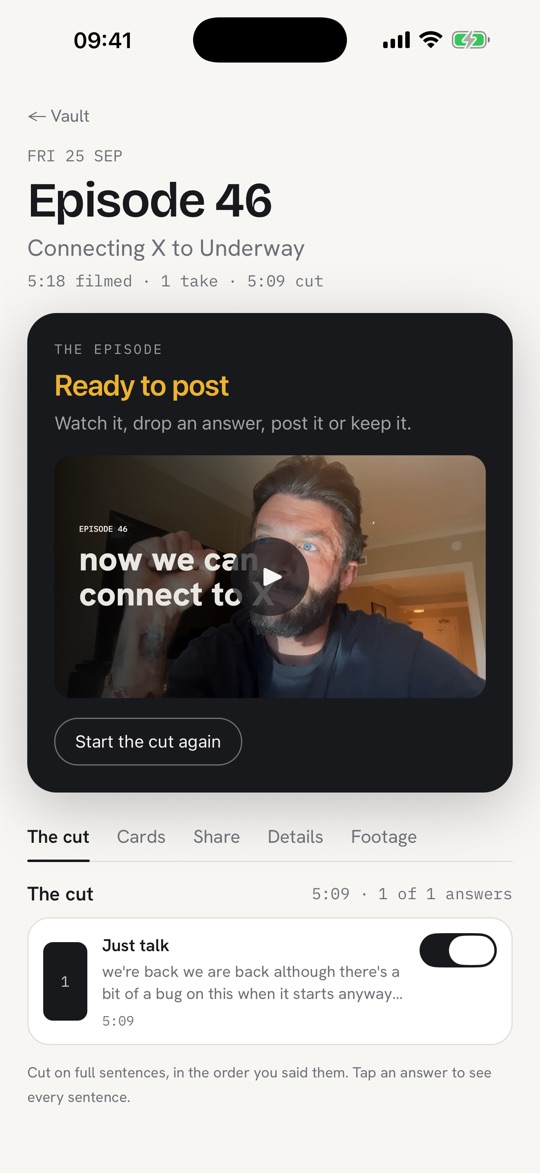
so the rule underway works to is simple. cuts stay in the order you spoke. the video opens on a title card and your first real answer, not on a teaser. if the first sentence of a take doesn't stand alone, it prefers a slightly later one that does, rather than lifting something from the end.
what you still do
- answer. about three minutes of it, to specific questions about your day. this is the only part that has to be you.
- look at it. most days the preview is the finished video.
- strike a line, if one shouldn't be there. one switch per answer turns it off and back on. nothing is destroyed, so every change can be undone.
- read the words before you post them. it's your name on them.
if you want finer control, it's there without becoming a job: a word-level transcript editor where clicking a word cuts it, a tenth-of-a-second handle for a breath at the end of a line, and a box where you type what to change in plain words. most people never open it.
four routes to founder video content without editing
| edit it yourself | hire an editor | clip tool on long recordings | interview-first diary | |
|---|---|---|---|---|
| examples | capcut, descript, imovie | a freelancer or an agency | opus clip, descript, riverside | underway |
| you start with | footage you filmed | footage you filmed and sent | a long recording, a podcast or a talk | nothing: it asks you questions |
| your time per video | the most of any route | filming, sending, reviewing | recording the long thing | about three minutes of answers |
| who decides what's in | you | the editor, with your notes | the tool, looking for highlights | you, by what you answer; the order is kept |
| ongoing cost | the app, plus your hours | an ongoing fee per video or per month | a subscription | free for three episodes, then £29 a month |
| good at | full control, any style | polish without your time | many clips from one recording | a daily habit with nothing to edit |
| weak at | surviving a busy week | speed, and daily volume | days with no long recording | exact scripted wording, ads |
each of these is the right answer for someone. descript's text-based editing and filler removal are genuinely good if you want to edit and just want it faster. opus clip is good at turning a long podcast into shorts. an editor is worth it if you record long-form weekly and have the budget. an interview-first diary is for the founder whose problem is that nothing gets recorded at all.
how underway makes founder video without editing
underway starts before the footage. through the day it collects what happened: your commits, your calendar, what a meeting recorder transcribed, emails you forward, and anything you catch yourself. whenever suits you, it suggests threads, writes questions from the one you pick, and asks them out loud, one at a time. you answer on camera, by voice only as a podcast, or while sharing your screen. on a standard episode it aims for about three minutes of answers and stops at five.
then it cuts. it transcribes each answer, chooses the cut on full sentences in the order you said them, removes filler and dead air, puts your episode card on the front, lays your captions on and renders on the server. it's ready a few minutes after you stop, and you can leave the page once it says it's rendering. every episode carries a small "made with underway" mark in the corner.
the look is set once, in two panels. brand: your logo, colours, caption style, typeface and an optional image behind the card. polish: dialogue clean-up, transitions, and face smoothing, which is off by default and meant to stay subtle. after that every episode looks like the same show, and you never make a design choice again unless you want one.
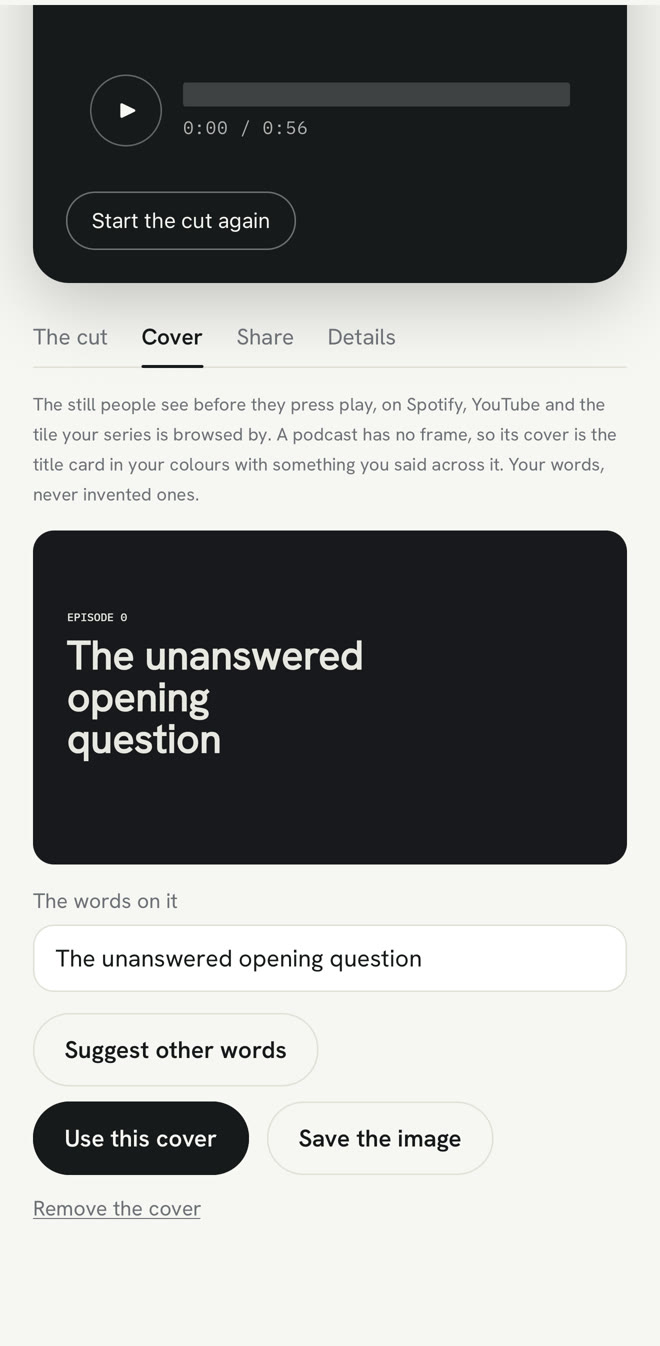
the words for every platform are written from your transcript, and nothing goes out until you send it. the raw footage is downloadable on every plan, free included. three episodes are free with no card. founder is £29 a month or £290 a year. series is £79 a month or £790 a year and adds the week in one cut, the month in one film and one tap to every connected network.
faqs
can I really post founder video without editing it?
yes, if the tool does the mechanical parts: filler, cuts on sentences, captions, card, audio and cover. you still answer, and you should watch it once before posting.
will an automatic edit cut things I wanted to keep?
a good one cuts filler, false starts and dead air, not content. on underway there's no length budget, so a four-minute answer with real energy stays four minutes, and any line the director dropped can be brought back.
is this the same as a clip tool like opus clip?
no. a clip tool starts from a long recording you already made and pulls highlights out of it. an interview-first diary starts from nothing, asks you questions and keeps your answers in order.
what about audio quality from a laptop mic?
levelling and clarity help a lot, and low rumble can be removed. a loud fan or a busy café can't be fully cleaned. a quieter room still beats any software.
do I have to be on camera?
no. on underway the same interview can run voice only as a podcast, or as a screen share with you in a small bubble in the corner.
where to go next
the diary version of this idea: a founder diary without editing.
why the look is chosen once: polish set once.
and what to do about the part that can't be automated: don't know what to say on camera.