
Article
submagic alternative: when you haven't filmed anything yet
28 October 2026 · 10 min read
Post on X
the right submagic alternative depends on what you have when you open it. Submagic captions and edits a short video you've already filmed: animated captions, B-roll, zooms, sound effects, then it schedules the post. if you have the clips and want them styled faster or cheaper, Vizard and Opus Clip are the closest swaps. if the hard part is that there's nothing filmed in the first place, no caption tool will fix that, and that's the job underway does.
underway starts from nothing. it interviews you, out loud, about your business and what you worked on, makes a numbered episode from your answers, and then cuts Shorts from it with captions lit word by word. we make underway, so this page says what each tool is for, from each one's own pages on 28 October 2026, and credits Submagic where it is better.
to judge the output rather than our description of it, a real series made with underway, every episode in order, is here.
key takeaways
- Submagic edits a video you bring. it's quick, its caption styles are the reason people use it, and paid plans export with no watermark.
- Vizard and Opus Clip are the nearest like-for-like swaps: both turn a long video into short clips with captions. Vizard has a free plan of 60 credits a month at 720p.
- every one of them needs footage first. underway is the submagic alternative for someone who doesn't have any: it asks the questions, you answer, and the footage is the result.
- if you film plenty and just want captions on it, stay with Submagic or try Vizard. if you never get round to filming, try underway.
- Submagic starts at $12 a month billed yearly ($19 monthly). underway starts at $29.99 a month, with a 7-day free trial.
what Submagic does well
Submagic is an editor for short vertical video. you upload a clip and it writes captions, in 123 languages by its own count, styled the way short-form video has come to look: big words, colour on the key word, emoji if you want them. around that it adds B-roll, auto-zoom, transitions, sound effects and background music, a feature that makes your eyes look at the camera, and AI-written hook titles. Magic Clips takes a long video and cuts it into several Shorts. when you're done, it can schedule the post to your channels.
it's priced by the video. Starter is $19 a month, or $12 a month billed yearly, for 15 videos up to two minutes long. Pro is $39, or $23 yearly, for 40 videos up to five minutes. Business is $69, or $41 yearly, for 100 videos up to thirty minutes, exported in 4K at 60 frames a second. all three list no watermark. there's no free plan on the pricing page, only a free try with no card needed.
for what it does, it's hard to beat on speed. if you already film yourself and the slow part is captioning and styling each clip, Submagic does that in minutes, on any clip you shot, whatever it's about. underway doesn't try to be a general caption editor: it only cuts Shorts from the episodes you make in it.
why people look for a submagic alternative
the searches tell you the reasons: free, without watermark, and what people on Reddit use instead. most of them are about price. a per-video allowance runs out fast if you post daily, the two-minute limit on Starter rules out longer clips, and some people only want captions and don't need the rest.
there's a second reason that shows up less in the search box and more in what people say when they stop. they bought a caption tool, and then had nothing to put in it. the editing was never the slow part. sitting down in front of a camera, deciding what to say, and saying it well enough to post, every day, was. a cheaper caption tool doesn't help with that, and neither does a better one.
so the useful question when choosing a submagic alternative isn't which one has the nicest captions. it's whether you're short of editing time or short of footage.
the closest submagic alternatives: Vizard and Opus Clip
if you have the footage and want the same kind of tool, these two are the usual swaps. both start from a video you upload.
- Vizard: built around clipping a long video into short ones, "30+ clips, in one click" by its own page, with captions, caption translation into more than 100 languages, editing by deleting words from the transcript, AI B-roll and 22 brand templates. its free plan gives 60 credits a month, a credit being a minute of video, with exports at 720p and capped at ten minutes. its Creator and Business plans remove the watermark and export in 4K. its paid prices didn't load as text when we checked, so read them on its pricing page.
- Opus Clip: also turns long videos into short clips with captions, reframing and publishing. the free plan exports with a watermark; Starter is $15 a month and Pro is $29 a month, both without one.
- CapCut, Descript and VEED come up on most lists too. they're full editors rather than caption tools, so you do more of the work yourself.
if you're after a submagic alternative without a watermark at the lowest price, Opus Clip's Starter is the cheapest monthly plan of the three here at $15, and Submagic's own Starter is cheaper still billed yearly at $12. if you're after free, Vizard's free plan is the most usable, as long as 720p is enough.
what underway does differently
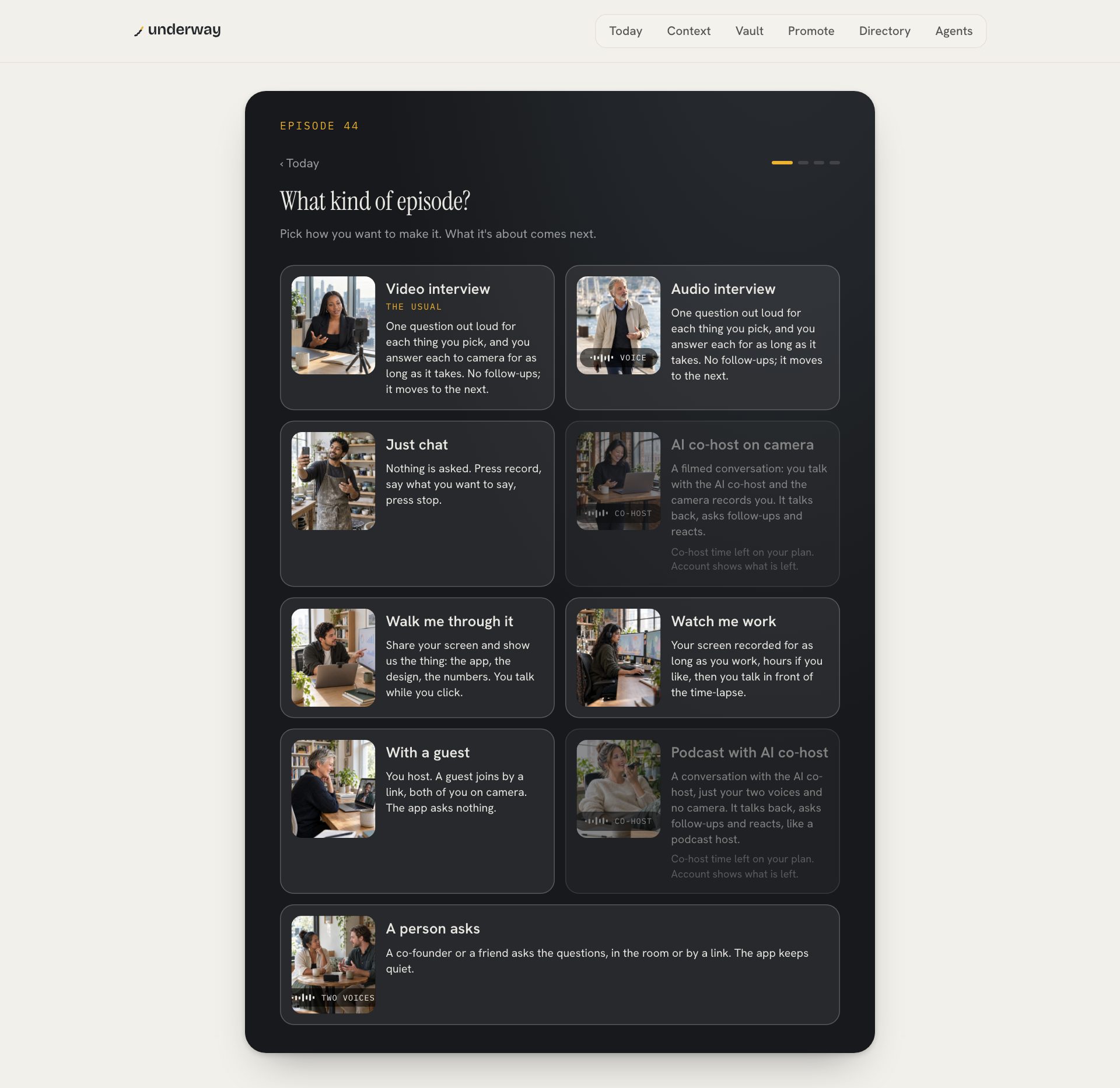
underway starts before there's anything to edit. you connect what you already use, read only: GitHub, your calendar, email you forward, Slack, your shop or payments, your website. before your first episode you film episode zero, a short interview about what you're building and who it's for, which becomes standing context for every interview after it.
then, whenever suits you, you pick what the episode is about from topics it suggests, or type your own. it asks one question out loud for each thing you picked, and you answer for as long as it takes. on camera or just your voice. it cuts the episode itself, filler and restarts out, captioned, numbered, always in the order you said things.
how underway's Shorts compare with Submagic's
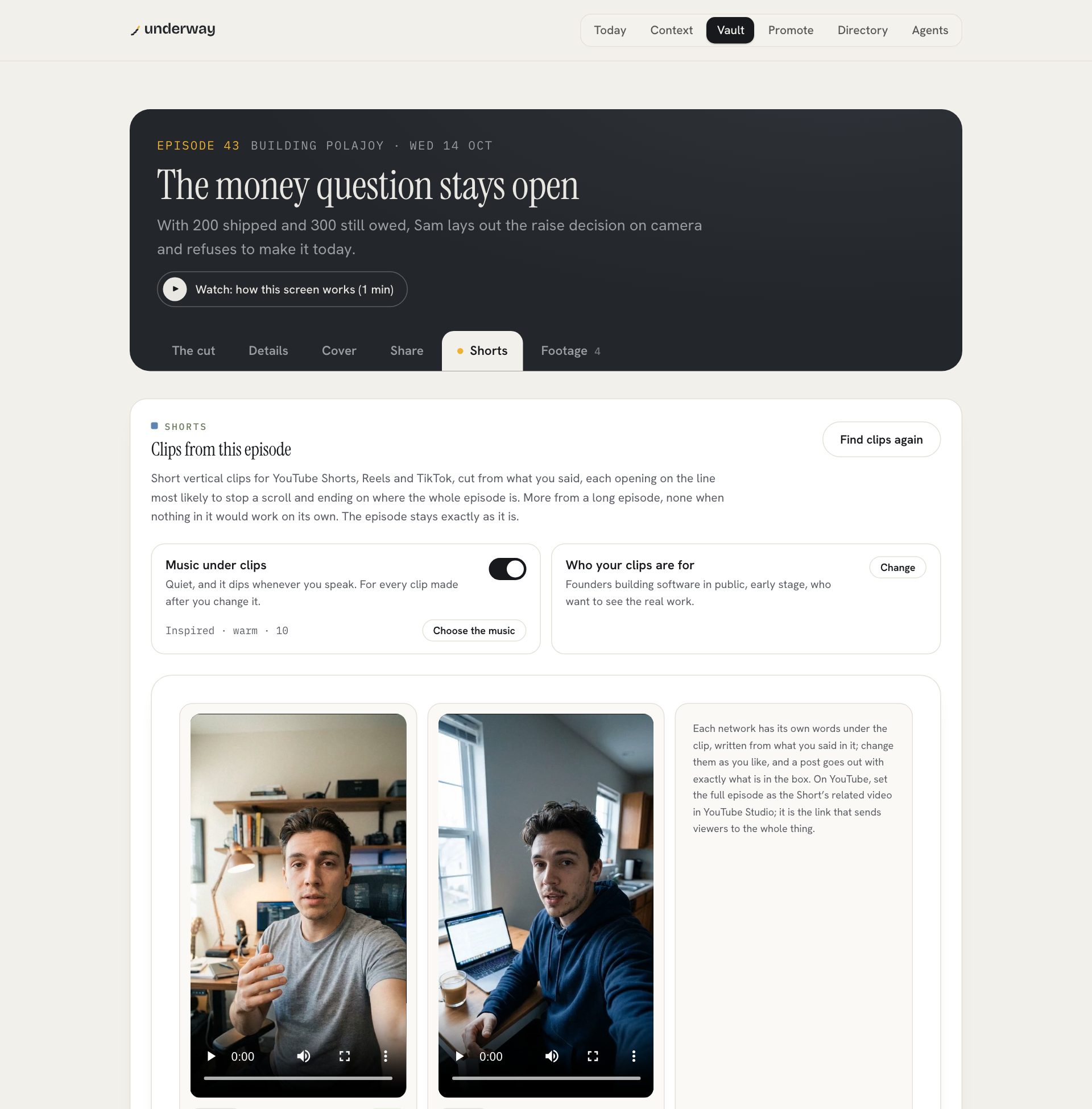
the Shorts are where underway and Submagic overlap, so it's worth being exact. on an episode's Shorts tab, Find clips reads the episode and cuts vertical clips, each one an advert for the full episode:
- each opens on the line most likely to stop a scroll, which can come from anywhere in the episode, then plays an unbroken run of what you said that makes its whole point, up to 90 seconds.
- the first second says the point three ways: your words heard, a few of them big on screen, and a drawing of the thing they name.
- your captions are lit word by word below your face, two lines at most.
- on a camera episode the top of the frame holds drawings of what you're saying, a ticked list, a number you said, steps, or a line drawing of a thing you named, with you in a strip along the bottom.
- a quiet music bed sits under your voice, and the last card says where the full episode is.
- only your words. nothing is invented, a line you struck from the episode never comes back, and when nothing in an episode would work on its own, you get no clip rather than a forced one.
what underway doesn't have is Submagic's range of caption styles and effects. you set your look once, your colours, typeface and title look, and every Short uses it, because a series should look the same in episode 12 and episode 40. if you want to restyle every clip differently, Submagic gives you far more to play with.
submagic alternative side by side
the tools on the questions that decide between them, each from its own pages on 28 October 2026.
| Submagic | Vizard | underway | |
|---|---|---|---|
| starts from | a clip you filmed | a long video you filmed | nothing: it interviews you |
| what it makes | a captioned, styled short | short clips from a long video | a numbered episode, then its Shorts |
| captions | many styles, 123 languages | captions, translation into 100+ languages | your look, lit word by word |
| B-roll | yes | AI B-roll | drawings of your own words; stock footage on Studio |
| who decides what to say | you, before you film | you, before you film | you, answering its questions |
| free | a free try, no card | 60 credits a month, 720p | 7-day trial, card needed |
| paid, per month | from $12 yearly, $19 monthly | see its pricing page | from $29.99, or $299.90 a year |
which is right for you
| choose | why | |
|---|---|---|
| you film a lot and want it captioned fast | Submagic | fast, stylish captions on any clip |
| you have long videos to chop up, on a budget | Vizard or Opus Clip | built for clipping long videos, with free plans |
| you mean to post about your business but never film | underway | it asks the questions, so the footage exists |
| you want a series people follow, not one-off clips | underway | numbered episodes, each Short points back to one |
| you want a different caption style on every clip | Submagic | underway keeps one look for the series |
some people will use both: underway for the episodes about their business, Submagic for the clips they film elsewhere. underway's episodes download, so nothing stops you putting one through another editor.
what underway costs
every new account starts with a 7-day free trial of Founder, Series or Studio. you add a card at the start and nothing is charged until day 8; cancel before then and you pay nothing. Founder is $29.99 a month or $299.90 a year: the interview, the finished episode, your page, the words for every platform, and up to two Shorts from an episode when you press Find clips. Series is $79.99 a month and makes an episode's Shorts on its own, up to three, and adds one tap to post them. Studio is $129.99 a month and adds things like Shorts with stock footage, YouTube thumbnails with your face in them and motion graphics. your raw recordings download on every plan.
what results look like
the clearest result we can show is our own. Rich Lovatt, who makes underway, films a numbered series about building it, with it: each episode an interview about that day's work, cut, captioned and clipped without opening an editor. they're on the series page in order. a caption tool makes clips look good. a series gives people a reason to come back for the next one.
faqs
what is the best submagic alternative?
for captioning and clipping video you already have, Vizard and Opus Clip are the closest swaps. for someone with nothing filmed who wants regular videos about their business, underway, which interviews you to make the footage and then cuts Shorts from it.
is there a free submagic alternative?
Vizard has a free plan of 60 credits a month, exported at 720p and capped at ten minutes. Opus Clip has a free plan that exports with a watermark. underway has a 7-day free trial with a card added at the start.
is there a submagic alternative without a watermark?
Submagic's own paid plans list no watermark. Opus Clip's paid plans, from $15 a month, and Vizard's paid plans have none either. every underway episode carries a small "made with underway" mark in the corner, on every plan.
can underway caption a video I filmed somewhere else?
no. underway cuts Shorts from the episodes you make in it. for captioning any clip you shot, Submagic or Vizard is the right tool.
does Submagic help me decide what to say?
it writes hook titles and captions for a clip you've made. it doesn't interview you. underway does: it asks the questions out loud, from what it knows about your business and your day, and you answer.
try underway free for 7 days
if the problem was never the captions, try a week of being asked. sign up, film episode zero about what you're building, and see a finished episode a few minutes after you stop talking, with its Shorts a press away. nothing is charged until day 8, and everything stays private until you choose to post it.
start your 7 days and film episode zero today.
where to go next
if you're weighing full editors too, ranked by how much editing each leaves you: the best descript alternatives.
for videos about your business with no editing at all: founder video without editing.
From the series
Founders’ episodes, written up.
Every public episode on underway has a page of its own: the video, then the same account in writing, checked against what the founder actually said.
Browse every series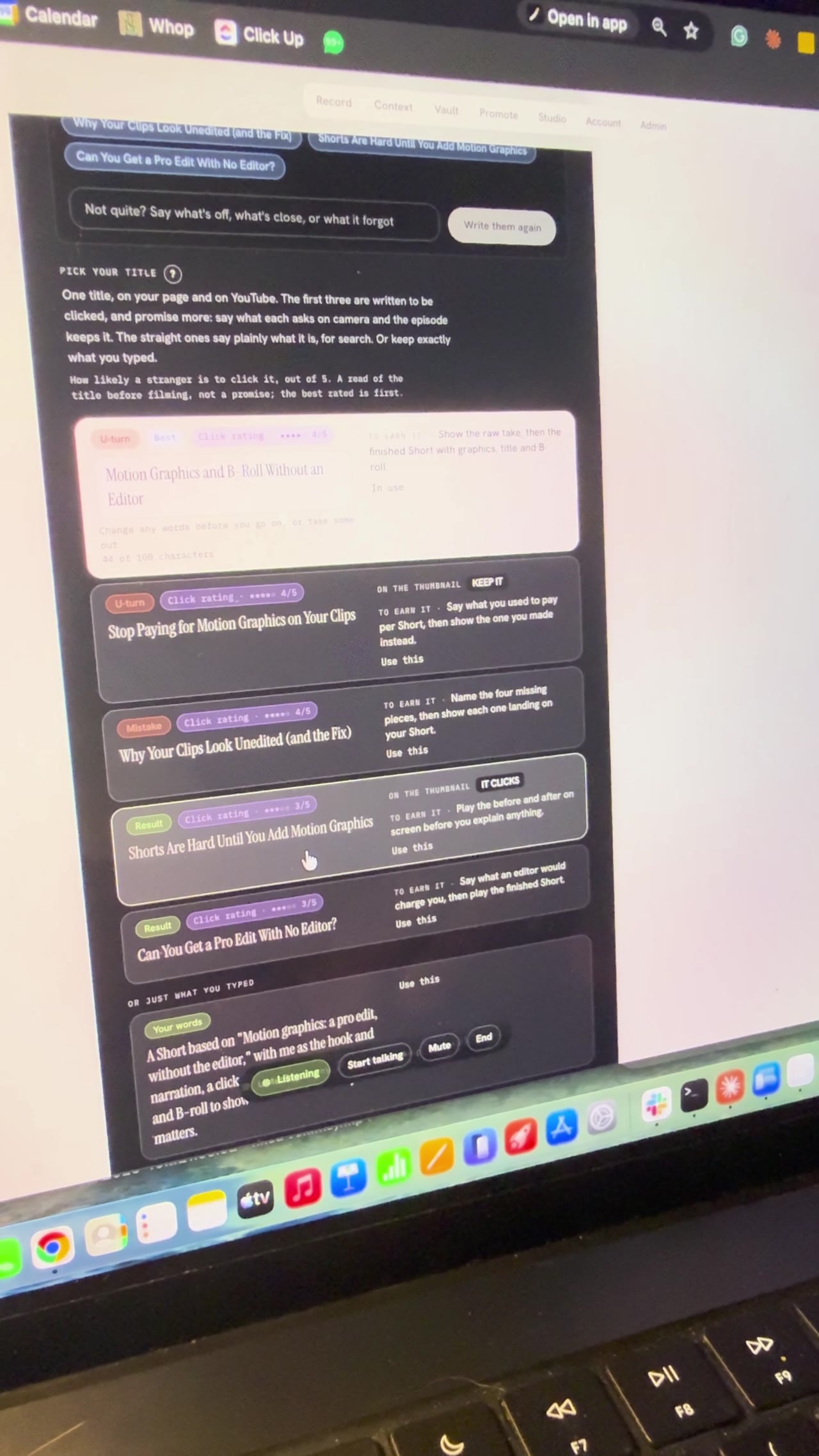
Building Underway
Setting up a video by talking to my AI director
I gave a first look at the Underway Crew, the director and producer inside Underway, and used an AI director to pick my YouTube title and sections live on camera. Bert, the director, offered three ideas, then found the feature videos in my vault, and we picked Motion Graphics, A Pro Edit Without the Editor to remake with me as the hook and narration. It wrote five title options, I chose Motion Graphics and B-roll Without an Editor, and it broke the episode into six sections. I locked in filming it in sections and stopped at the set up your shot screen, so part two comes next.
Building Underway
SaaS pricing for a higher tier, nearing 10 paying customers
I talked through how I'm pricing Underway's next tier while closing in on the goal of 10 paying customers I set when series one opened. There are somewhere around 15 to 20 people on trial and very few have cancelled, and most signups are now on the $129.99 plan with a seven day free trial, even though people close to me still say they don't quite grasp what Underway does. I'm also in the early stages of a higher-priced membership that acts like a director and producer in your pocket: it researches your niche, brings you video ideas when you say you're ready to film, and talks you through the recording section by section. I'm using it on myself while I build it.
Building Underway
AI podcast host that interviews you: my build so far
Tonight was a hell of a long one. Continued build from the evening as well. GPT looked at my site and codebase and came back with some legit ideas. Both videos on the site are fine, it said, but nothing shows what being on the inside looks like. Especially the podcast path for founders who want to talk but don't want to be on camera. I thought working on the podcast would be simple compared to video. It wasn't. Far behind, and way more fiddly than I imagined. In my head it wasn't just rambling into a mic. You're speaking to something that knows your business, what you've said, what you've achieved. What I built is Just Chat. Tired, don't want the camera, you just talk like someone's in the room asking you questions. It remembers last night's lag, the interview scaffolding I stripped out, the patent lawyer, all of it. You can have the app host, or someone in the room, or send a link so they join without installing anything. I've also made topics simple. It suggests some, or I type "let's talk about hiring" and we go. Tonight I want to record another episode with Just Chat itself so you can hear how it comes out. The breakthrough for me is wanting that same tech on the video side. Right now video questions are still a bit robotic. You pick four, it asks, you tap done. Fine, but after Just Chat it feels different. Downside of all this is it ends up quite expensive. We will see. Episode 16 (1 of 2 filmed on 7 Sept).

Building Underway
Posting Is Hard Until an AI Agent Directs You
Underway Producer is the AI video director I built that picks up what I'm filming, sets me up and directs me through each take out loud. It connects to my email, GitHub, Linear and Vercel, so the agent speaking to me knows what my day held. Each take comes out as a fully edited long episode with captions, shorts and clips, thumbnails, the copywriting for every social post, an SEO article, and it posts to all my channels in the right format. I filmed alone for years with no plan and bad lighting, and most of that footage never left my camera phone.
Building Underway
Making a launch video with AI in one shot: GPT-6 Astra
GPT-6 Astra dropped a few days ago. I kept seeing people on X say they'd one-shot a launch video with it, and the clips looked wild. So I gave it a go. Sent what came back to my fiancée. We both just sat there for a second. She said she was proud of me, because it finally looked like the thing I've been trying to build and the problem it solves. Also added two bits that feed into the patent application: a watcher that bumps you when you hit a milestone so you can record the feeling right then, and a habit former that learns how you like to film. Episode 12 done.
Building Underway
AI that suggests video topics from your past episodes
I said on the last episode I'd do the podcast next, but I lied. I had something else I wanted to show you first. It's a suggested topics tab. It reads everything I've said in every episode and picks up the things I never tied off, like when I say I've been thinking about something but haven't decided. The one it gave me was whether the videographer shoot still happens. I booked him for next weekend, then GPT-6 Astra one-shotted something I said I'd pay a lot for, and I never said on camera whether I kept the booking or cancelled. It quoted me back to myself, "I haven't made my mind up yet". So I can just do a whole episode on that and close it off. If it suggests an old topic I know I'm not going back to, I can remove it. That doesn't mean something like it won't come up again, it just gets replaced. Then I clicked stop sharing and the timer kept going. It didn't say I'd stopped. When I came back to the tab I think it had. We'll watch this back and see. Another bug. Episode 14 done.