
Directory · Building Underway · S1 · Episode 97

S1 · Episode 97

How to Plan a YouTube Video With AI (Titles, Hook, Sections)

filmed 29 October 2026 · 7:14

♡ Like
XLinkedInWhatsApp

I planned a YouTube video with AI by talking to Bert, the director inside Underway, live on camera. Bert offered three ideas, then found the feature videos in my vault, and we picked Motion Graphics, A Pro Edit Without the Editor to remake with me as the hook and narration. It wrote five title options, I chose Motion Graphics and B-roll Without an Editor, and it broke the video into six sections to film one at a time. I stopped at the set up your shot screen, so part two is where I film it.

How do you plan a YouTube video with AI, including the title, hook and sections?

by Richard Lovatt · updated 30 October 2026

I use Underway Producer: tell it what the video should be about, and it reads YouTube to see what people actually click, writes five titles rated for how likely a stranger is to click, then breaks the chosen title into sections, each telling you what to say and what to leave for the next one. You film section by section with no script, and it edits the sections together.

In short

  • Five titles come with a click rating out of five, a read before filming, not a promise
  • The best-rated title is shown first; you can still keep exactly what you typed instead
  • Sections are planned before you film, each with what to say and what to leave for the next
  • You can film in short sections one at a time or all in one take with your hook above the camera
  • It can take a while to write titles and sections, so there is a wait while it works

What planning a YouTube video with AI actually means

Planning a video usually means three separate jobs: deciding what the video is about, writing a title worth clicking, and working out what to say and in what order. Most people do none of this properly. They open the camera, talk for a bit, and either never post it or spend hours afterwards trying to cut something watchable out of a ramble.

What I wanted was something that does the planning before I press record, not after. I wanted Underway's director, Bert, to ask me what I'm making, go and look at what's actually winning on YouTube for that topic, write titles rated for how likely someone is to click, and then turn whichever one I pick into sections I can film one at a time.

I asked Bert to take one of our AI-animated feature videos, in this case Motion Graphics, a Pro Edit Without the Editor, and turn it into something I could film myself, with me as the hook and the narration instead of an AI voice.

The options people try, and where they fall short

Mean to film it and never start. The idea sits in your head and nothing gets made.

Write a rough title yourself. You guess at what sounds good, with no read on what strangers would actually click.

Record one long take and hope to cut it later. Without sections planned in advance, the edit afterwards is where most videos die.

Hire or learn an editor. It works, but it is slow, it costs money, and it puts a person between you and what you actually wanted to say.

None of these give you the two things that actually decide whether a video gets watched: a title that earns the click, and a structure that keeps the point moving once someone clicks it.

Setting up the short, step by step

I told Bert, my director, that I wanted to recreate one of the AI animated feature videos as a real short, with me as the hook and narration, dotted with B-roll. Bert checked what I already had in the vault, found the matching videos, and asked which one I wanted. I picked Motion Graphics, a Pro Edit Without the Editor, and asked for a hook-driven approach with a click-worthy title and sections.

Once I confirmed the direction, Bert locked it in as a hook-driven short and stayed with me through each setup screen, prompting me to pick or change things as they appeared rather than disappearing to do it all at once.
The app loading the next setup screen after choosing which feature video to recreate.

Writing the five titles

This is the part that takes patience. Bert scans YouTube to work out what's actually getting clicked on this topic before it writes anything, so there's a wait while the five titles and an opening get written. You can watch it happen on screen rather than it just appearing.

When it finished, I had five options: Motion Graphics and B-Roll Without an Editor, Stop Paying for Motion Graphics on Your Clips, Why Your Clips Look Unedited, Shorts Are Hard Until You Add Motion Graphics, and Can You Get a Pro Edit With No Editor. Each one carries a click rating out of five, which is a read of the title before filming, not a promise of what it will actually do once it's live.
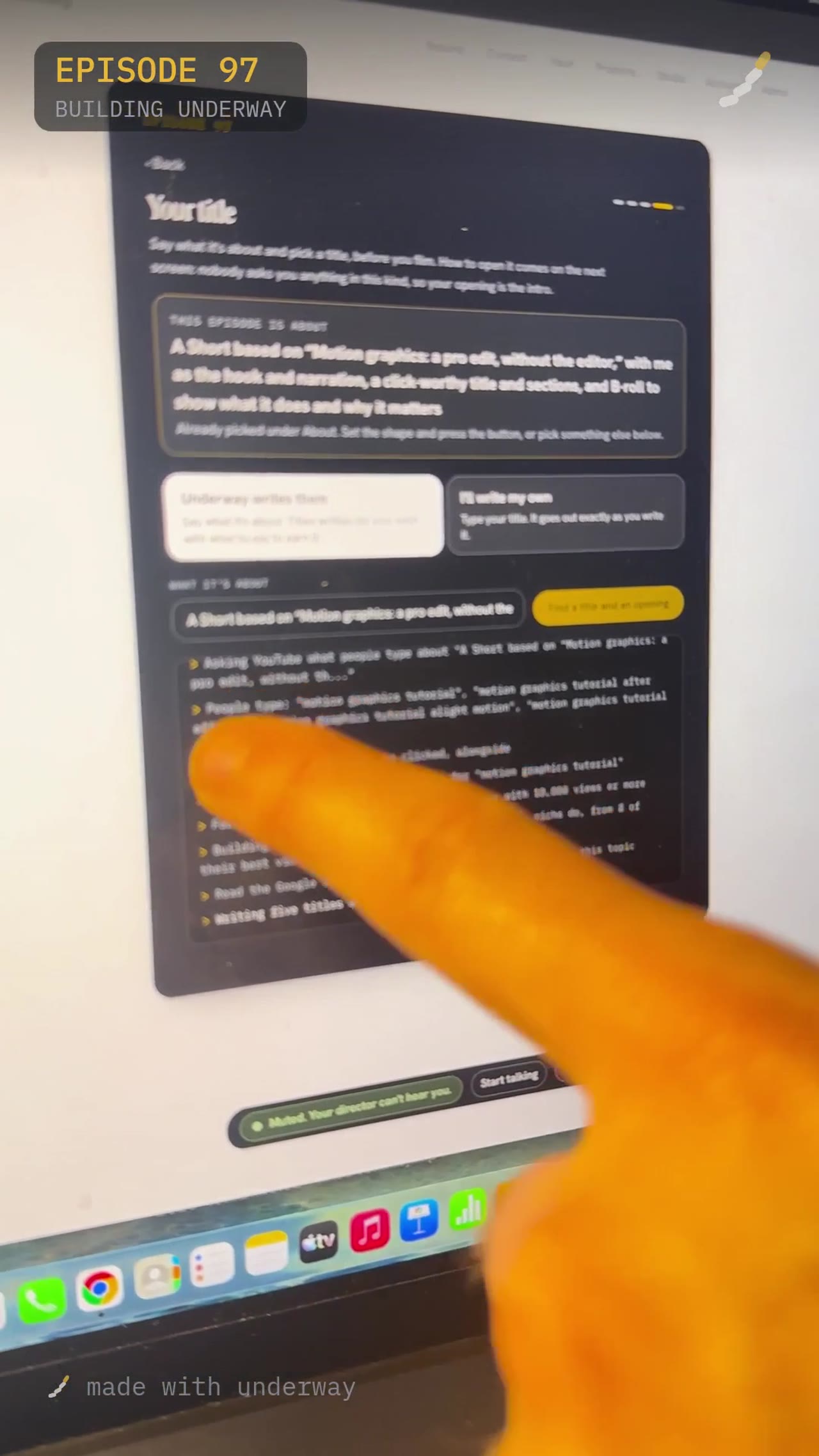
The titles and opening being written, asking YouTube what people type about the topic before writing anything.

Choosing the title

I asked Bert which one it thought was best, and it recommended Motion Graphics and B-Roll Without an Editor. I went with that one.

You don't have to take the top-rated one. There is always an option to keep exactly what you typed if none of the generated titles feel right, and you can ask it to write them again if it's close but not quite there.
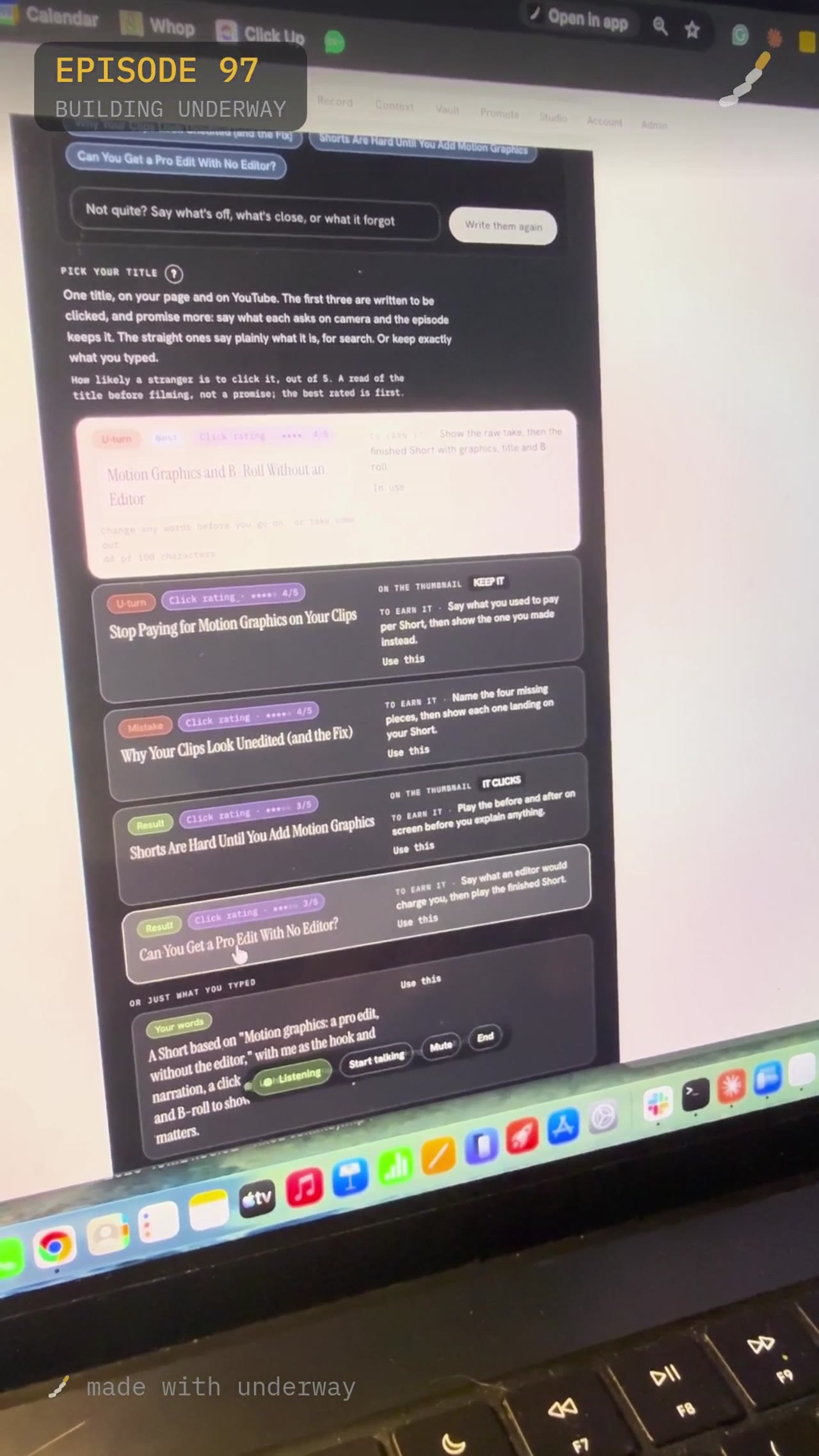
The five title options, each with a click rating out of five and a note on what earns the thumbnail and the title.

Planning the sections

Once the title was locked, I asked Bert to set it up in sections so it would be easy to film and understand. It writes a structure with a hook, a body made of a few sections, and a close, and tells you roughly what to cover and what to leave for the next section, so you're not repeating yourself or leaving gaps.

For this episode, the plan came back with six sections: raw take next to the finished one, why your flat take loses people, motion captions that lift one word, the title card after your hook, B-roll goes where you name a thing, and what to do with your next take. Each one is just a name at this stage; what to actually say in it comes up when you film.
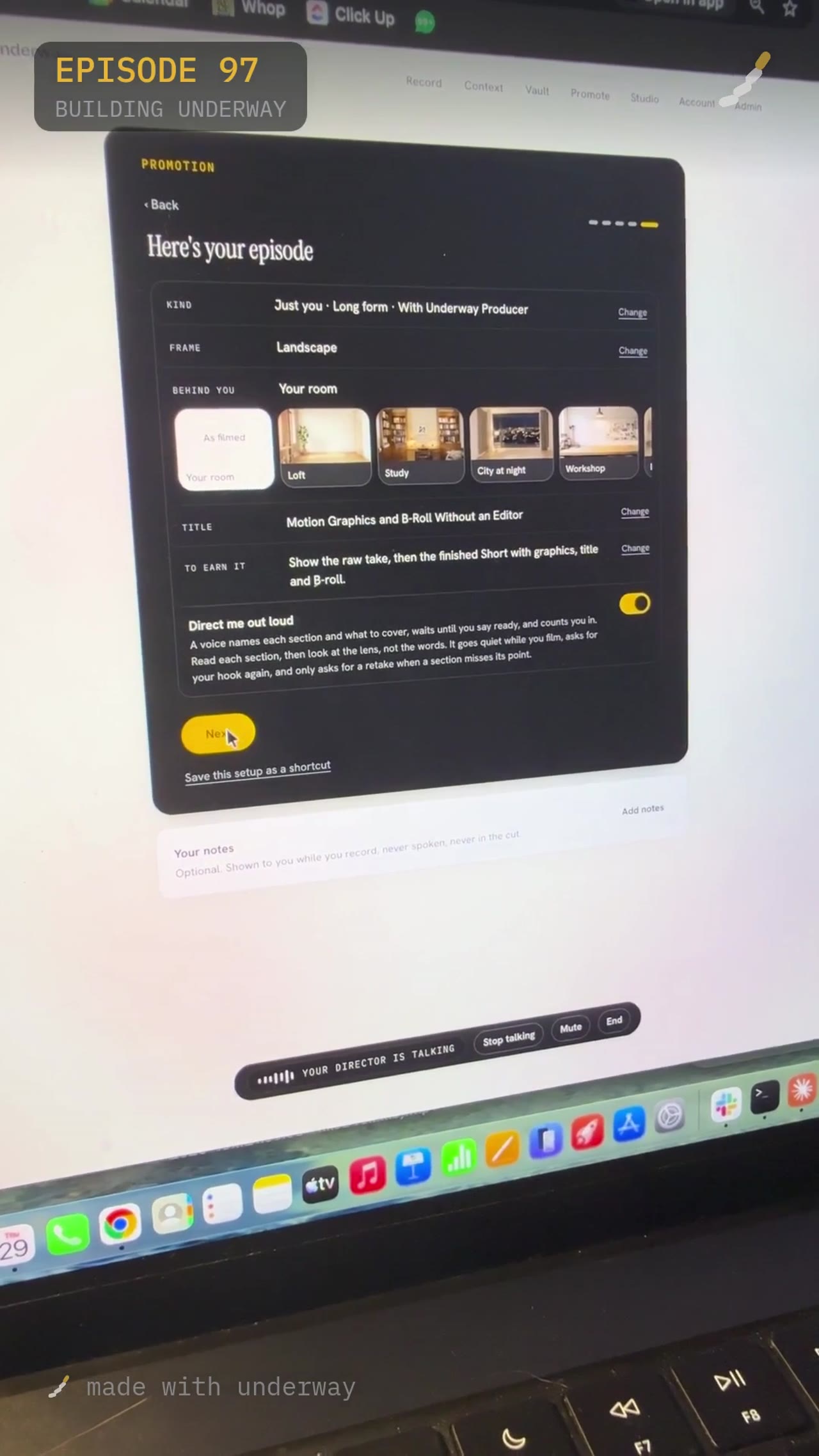
The finished episode screen showing the title, the sections, and the toggle for the director to talk you through it out loud.

Filming in sections versus one long take

Before filming, Bert asks how you want to film it: in sections, each with its own take, or all in one go. I chose sections, because it keeps each piece short and means I can retake just one part if it isn't right, rather than redoing the whole thing.

If you film it in one take instead, you say it all in one go with your opening written above the camera, and it's joined up afterwards. For longer videos, 30 minutes or more, it treats them as chapters rather than takes: one continuous run that gets split into its own YouTube chapters.
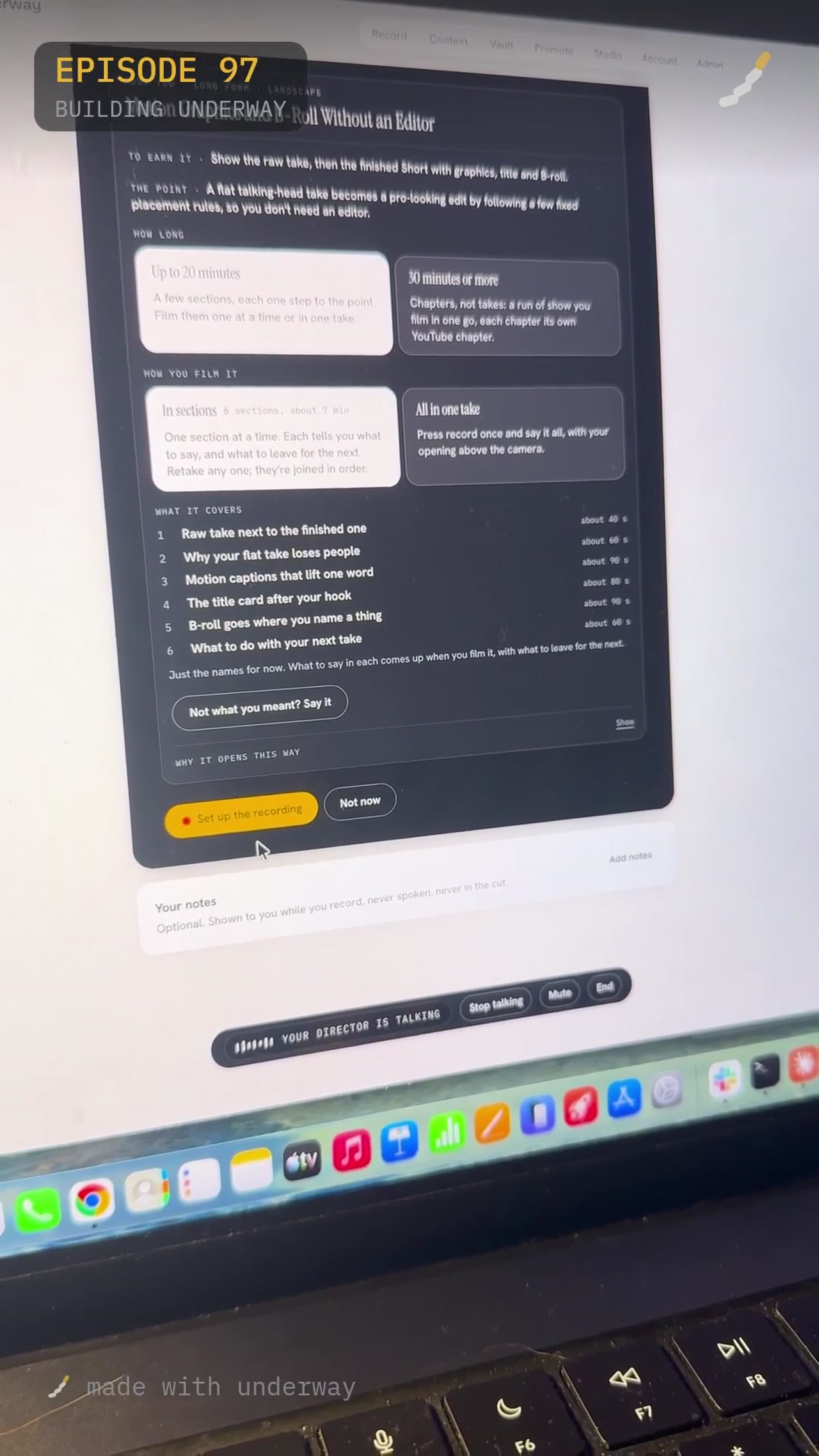
How you film it: in sections with six separate takes, or all in one take, with what each section covers listed below.

Recording the hook

The first section is just the hook, with up to forty seconds and no clock forcing you to stop early. The guidance was to say it three or four times and it picks the best one, with an example line to work from rather than a blank page.

Once I was happy, I pressed next and moved to the next section. The point of the whole setup is that each section tells you what to say and what to leave for later, so by the time you're filming there is nothing left to plan, only to say.

What it costs in time, and who this suits

The writing stages, titles and then sections, both involve a genuine wait while it reads YouTube and works out the structure. It's not instant, and you do have to sit through a loading screen more than once, but the sections themselves are built to be filmed quickly.

This suits anyone who has an idea for a video but freezes at the blank page: what to call it, what to say first, what to say next. It is less useful if you already have a script you like and just want it filmed, since the whole point is that Bert is writing the title and the structure for you, not following one you hand it.

Questions people ask

Do I have to use the title Underway recommends?

No. Bert rates five titles out of five for how likely a stranger is to click, and puts the best-rated one first, but you can pick any of the five, or keep exactly what you originally typed as your own title instead.

What if none of the five titles feel right?

You can tell Bert what's off, what's close, or what it missed, and it writes them again rather than you having to start the whole setup over.

Can I change the order of the sections once they're written?

Yes, you can ask to rename or reorder the sections before you press next and move on to filming.

What happens if I'm not happy with one section I filmed?

You retake just that section; the sections are joined in order afterwards so you don't need to refilm anything that's already working.

Does the title click rating mean the video will actually get that many clicks?

No, it's described as a read of the title before filming, not a promise. It's a judgement on the title itself, not a guarantee of performance once it's live.

Read the transcript

I'm gonna give you guys a real sneak peek into something I've been working on for Underway, and it's the Underway Crew. So you have your Underway director and the Underway producer in your pocket, basically in your phone. Let's get into it. So if you can see on my screen right here, we're gonna click on, you've got here, Bert, your director. So we've got, "Nice one, Rich. That's one filmed." It's got another in you've got ideas. So we're gonna click on Film Your Director. So it's gonna open up. Gotta have a bit of patience with this game, and now you can see at the top it says, "Connecting your director and some ideas." Hey, Rich. I'm Bert, your director. Today's three are, one, can you get trials for $28 in ads? Two, 88 in, 2,700 out. And three, the sales page every solo founder needs to see. Which one do you wanna do? Or do you want more ideas, or one of your own? Hi, Bert. So I'm thinking, actually, I've got a few ideas in my head. So if you look in my vault in the Asset section, there's a number of videos in there that I'm not sure if they're called feature films, but they basically highlight some of the features that Underway has, and they're currently AI animated videos. I wanna kind of recreate them myself, where I'm the hook, I'm the narration, and you dot that a- amongst B footage at the same time. Is that something we can do? Let me check what you've already got in your vault so we line this up correctly. You've got a lot of those, 96 in Other Videos. A few that match what you described are AI Clone, Your Face and Your Voice Promoting Your Business, Agents, Your AI on Camera, and Motion Graphics, A Pro Edit Without the Editor. Which one do you wanna start with? Okay. Or should I pick one- Actually ... to turn into a single episode with you as the hook and narration? Yeah. Let's go with the a- the animation one. Which one was that? There are two that sound like that. One is AI Clone, Your Face and Your Voice Promoting Your Business. The other is Motion Graphics, A Pro Edit Without the- Okay. Let's do the Motion Graphics one. Can you set that up as a short, where we're gonna go for something like a click-worthy title? We're gonna start on a hook and sell or do the same kind of thing as this video. Is that something we can set up now? Nice. That's clear. I'll set up that episode with the hook-driven approach you described. All set up as a hook-driven short with a click-worthy title in sections. I'll stay with you through the setup screens. When the next options appear, we'll pick what fits and move forward. Perfect. Thanks. Great. It's still writing the titles, so we'll hang here a moment. When they're ready, you can pick one or- Okay. For everyone watching now, it's now loading, and you can actually watch on your screen that it's writing the five titles here and an opening. So you can watch it follow, and you can follow along here whilst it does it. Now, you do have to be a bit patient, 'cause it's scanning YouTube and figuring out what could be the best titles. So if I now unmute this, it's gonna talk. Perfect. How are we getting on, Bert? It's still writing the titles, so we're in a brief pause. As soon as they appear, you can tap one or tell me what you'd like to change, and we'll move on. Got it. Can you explain what it's doing? It's finished generating title options based on the setup you chose. I can't see the actual list text from here, so if you read the first one or two or tell me which number you like, I'll help you pick, or we can change the direction. Okay, perfect. So we've got Motion Graphics and B-roll Without an Editor. We've got Stop Paying for Motion Graphics on Your Clips, Why Your Clips Look Unedited, Shorts are Hard Until You Add Motion Graphics, and Can You Get a Pro Edit With No Editor? So, um, what do you think is, which one do you think is the best title? I'd go with Motion Graphics and B-roll Without an Editor. Okay, perfect. Can you set that up for me so it's, um, in sections easily, for me to easily understand? Got it. We'll lock that in and get the structure clear. One moment. Here's your episode screen. The structure is set, and to earn the title, you show the raw take first, then the finished short with graphics, title, and B-roll. There are five sections. The first two are the edit nobody made and what it actually does. If you want to rename or reorder them, say so. Otherwise, when you're happy, you press the next button yourself. We're on your plan, and it's still writing your sections, so there's nothing to pick yet. So everyone watching, it's now writing the sections to it so that this video is now gonna be put into sections so you can easily record each section yourself in nice small clips. It will edit it all together at the end. So again, you have to be a bit patient, because it's figuring out what would be the best way to shoot this video itself. So it's gonna have a hook and a section one section. The section two might be the body. It will give you some bullet points about what you might wanna create and what, what you might wanna say in each one. Um, then it's all gonna tell you how to finish and what you wanna end on. You can do it up here with up to 20 minutes or 30 minutes or more. This one is if you just want no pressure, but at the end of the day, it's gonna clip it all together and figure out the best bits for you. So let's ask it where it's, where it is Where are we at, Bert? We're still on your plan, and it's writing your sections. There's nothing to choose yet. Once it finishes, we can tweak the structure if you want, and when you're happy, you press next yourself. Perfect. So I can see here it says, "Making twelve things stronger." So is that because it's written some sections, and then they weren't really good enough? Let me think about how to explain what that status likely means. I can't see the exact "making twelve things stronger" message from here, so I can't say for sure what it's counting. What I can see is that it's still writing your sections. That usually means it's refining the structure before it shows you the final list to choose from. Once it's done, we can tweak what it generated. Your plan is ready. It's a structured episode with six sections. The first two are raw take next to the finished one, and why your flat take loses people. Now you just choose how to film it, either in sections with six takes or all in one take. Which do you want? Let's do in section, so I can do it bit by bit. Nice. That keeps it manageable. I'll lock that filming style in now. Done. We've locked in filming it in sections, so you can record each part as its own take. When you're happy with the plan, press the button to set up the recording. You're on set up your shot. Turn on your camera and mic. Make sure the framing i- Okay, guys. So real simple now. Before, I'm not gonna film this. I'm just gonna show you, and you might be able to see me on camera now and my beautiful fiancée. So as you can see at the top, we've got just your hook. I get forty seconds to do this, no clock. When it says forty seconds, you can do more than that. It said, "Say it three or four times," and it'll pick the best one. So it gives you an example here, so you can just be no pressure. You can just say it. So you say, "This is my raw take. This is the same take with motion graphics, a title card, and B-roll, and nobody edited it. Same words, same camera." So the idea of this is it's gonna edit it, so it puts those side by side in the end edit. You do not have to think about this. Once I've done, I will click Next, and we'll go on to the next section. I'll show you a part two next time.

Made with underway. It reads the founder’s day, asks them about it out loud, and turns the answers into episodes like this one.

Start your own, free

Comments

0

Sign in to comment. A viewer account is free.

  • No comments yet. Be the first to say something to the founder.