
New in underway
how to put clickable link in instagram bio, and what to link
6 October 2026 · 8 min read
Post on X
here is how to put clickable link in instagram bio: open the instagram app, go to your profile, tap edit profile, tap links, then add external link. paste the full address, give it a short title if you like, and tap done. the link shows under your bio text and anyone can tap it. a web address typed into the bio text itself, or into a caption, stays plain text and does nothing when pressed.
that is the whole mechanic, and most pages that rank for it stop there. the harder questions come after: which link to put there, what to do when you have more than one, why a link in a reel's caption never works, and how to make every reel you post send people to the same place. this page answers those too, for instagram first and then tiktok, youtube, x and linkedin, and ends with how underway hands you the one address worth putting in your bio if you film a series.
how to put clickable link in instagram bio, step by step
- open the instagram app on your phone and tap your profile picture, bottom right
- tap edit profile
- tap links, then add external link
- paste the address, starting https://, so instagram reads it as a link
- add a title, which is what shows instead of the raw address when you have more than one link
- tap done, then check your profile: the link sits under your bio, and pressing it opens the page
instagram lets you add up to five links this way. the first one shows on your profile, with a count beside it, and tapping it opens the full list. so the order matters: put the link you most want pressed first.
if the links option is missing, update the app. if a link will not save, the usual reasons are a typo in the address, a page that is down, or a site instagram has flagged. try the address in a browser first. a shortened link from a service people do not recognise is more likely to be refused than a plain one from your own domain.
why the bio is the only clickable link you get
instagram is built to keep people on instagram, so it gives you very few places where a link can be pressed. it helps to know exactly where they are before you plan around them.
| where | can people tap a link? | what to do instead | |
|---|---|---|---|
| bio links | yes, up to five | put your most important address first | |
| a post or reel caption | no, it shows as plain text | point to the link in your bio | |
| comments | no | the same | |
| stories | yes, with the link sticker | use it for one-off links, like a launch | |
| direct messages | yes | useful when someone asks |
so a reel cannot carry its own link. whatever the reel promises, the way to it runs through your profile: someone watches, taps your name, sees the bio, taps the link. every step loses people, which is why the link that sits there should be the one that does the most for you, every time, rather than something you swap for each post.
one link or a link in bio page?
if you have one thing you want people to reach, link straight to it. a link in bio page, from tools like linktree, beacons or taplink, is a small page of buttons that sits between your profile and your sites. it is the right answer when you genuinely have several destinations of equal weight: a shop, a booking page, a newsletter, a podcast.
it is the wrong answer when one of those matters far more than the rest, because every extra button is a choice the visitor has to make, and people who have to choose often choose nothing. instagram's own five links now cover most cases without a middle page, and they keep your own address visible, which is worth something when people are deciding whether to trust a link.
- one destination that matters most: link to it directly, first in the list
- two to five destinations: use instagram's own links, each with a clear title
- more than five, or you want to see which button gets pressed: a link in bio page
- a launch, a sale or anything that ends: a story link sticker, so your bio stays the same
how to put clickable link in instagram bio, tiktok, youtube, x and linkedin
the same idea works on every network: one address, in the one place that network lets people tap. the menus differ.
- instagram: edit profile, then links, then add external link.
- tiktok: edit profile, then website. tiktok shows the website field only to some accounts, typically business accounts and personal accounts past a follower threshold, so if you cannot see it, that is why.
- youtube: customise channel, then the profile section, then links. for shorts, also set the full video as each short's related video in youtube studio: it shows as a link on the short itself, and it is the one a shorts viewer can actually press.
- x: edit profile, then website.
- linkedin: edit your intro, then add your website.
no app can edit your profile on these networks for you. it is a minute per network, done once, and it works for every post after it.
what to link to if you film a series
if your reels are cut from something longer, a podcast, a video diary, a youtube channel, the best link is the place where all of it lives in order. a single episode goes stale the day the next one comes out. a homepage that sells something asks a viewer who came for a story to switch into buying. a page with every episode on it does neither: it is where someone who liked one clip goes to watch the rest, and it never needs changing.
this is the job underway does for founders. it interviews you on camera about what actually happened in your work, cuts each episode for you, and numbers it. once your series is public it has a page, underway.life/series/ and your series' address, with every public episode in order, each with a page of its own, your name, what you are building and a follow button. a viewer who arrives from a clip lands on the series rather than one post, and can start at episode 0 or watch the one the clip came from.
where underway puts your page's address
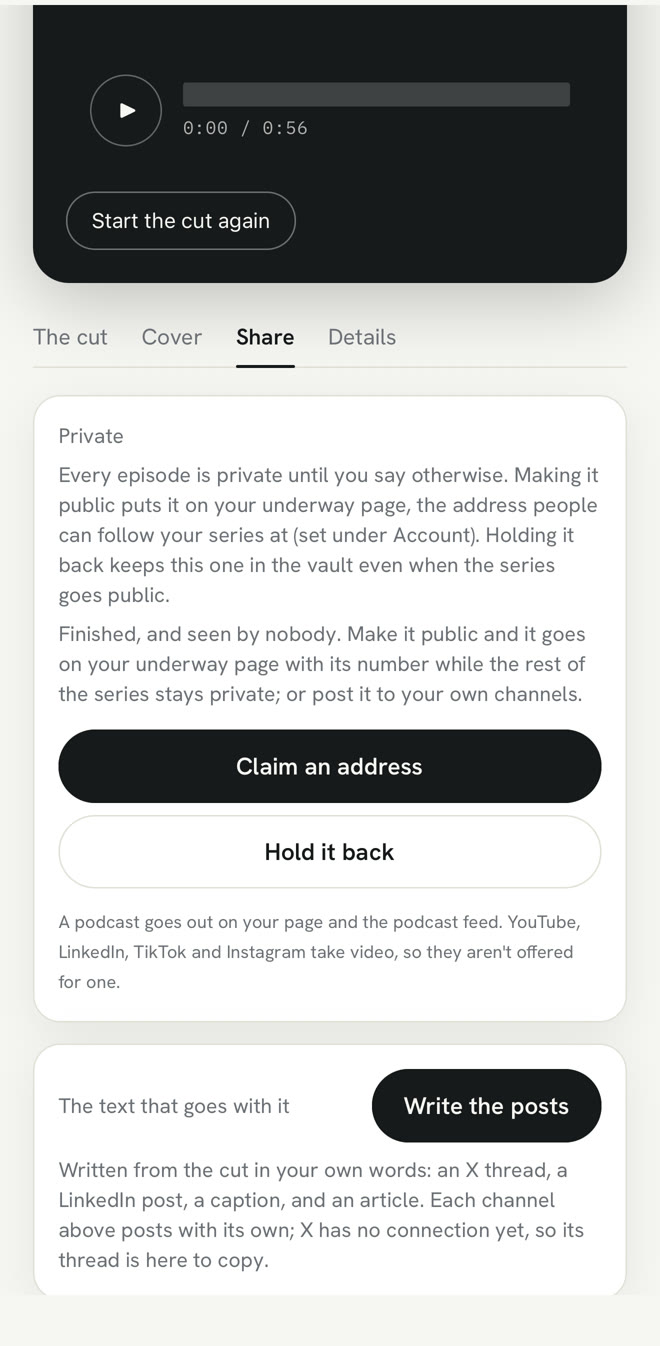
every finished episode in underway has a shorts tab. find clips there cuts short vertical clips from what you said, for youtube shorts, reels and tiktok, each opening on a strong line of yours and ending on a last card that says where the full episode is. the card names your page's address. but on instagram, tiktok and shorts nobody can press an address on screen or in a caption, so the card only works if the same address is in your bio.
so once your series is public, put your page in your bio sits under the clips on the shorts tab, with your page's address and a copy button. on the phone it is copy or share, which opens the share sheet. paste it into your bio on each network once, and every clip you post after that has somewhere to send people.
- it shows once your series is public; a series still in the vault has no public page yet, so there is no address to give
- the address is the same one on every clip's last card, so the card and your bio always agree
- it does not change from one episode to the next, so you do this once per network
- it is on the web and the phone
why the clip's caption doesn't say link in bio
underway writes the words for each clip's post from what you said in that clip and nothing else: no links, no link in bio, no lines sending people somewhere. a caption written like a funnel makes a clip read like an advert, and on instagram a link in a caption does nothing anyway. the last card does the pointing. the bio is what makes it work. you can change any of the words before you post, and they are yours to add a line to if you want one.
checking your bio link works
- open your profile from a second account, or ask someone to, and tap the link: what you see from your own account is not always what a visitor sees
- open it on a phone, since that is where almost every tap from instagram comes from, and check the page reads at that width
- if you change the address of the page you link to, update the bio; underway's page keeps an old address pointing to the new one, but a fresh link is better
- look at it again after any big change to your site, so nobody lands on a missing page
faqs
why isn't the link in my instagram bio clickable?
it was typed into the bio text. only addresses added under edit profile, links, add external link become buttons. delete it from the text and add it there.
how many links can i put in my instagram bio?
up to five, through edit profile, then links. the first shows on your profile and the rest open from it, so put the most important one first.
can i put a clickable link in an instagram reel?
no. a link in a reel's caption or comments is plain text. point people to your bio instead, or use a link sticker in a story.
why don't i see put your page in your bio in underway?
it shows under your clips once your series is public. a series in the vault has no public page, so there is no address to share yet.
can underway put the link in my bio for me?
no. instagram, tiktok, youtube, x and linkedin don't let an app edit your profile. you copy the address and paste it once on each network.
will the address change if i rename my series?
if you change your page's address, the old one points to the new one, so a bio with the old address still works. paste the new one when you get a minute.
the picture people see before they tap: how to choose a cover photo for an instagram reel.
what to post when you document a build on instagram: building in public on instagram.
From the series
Founders’ episodes, written up.
Every public episode on underway has a page of its own: the video, then the same account in writing, checked against what the founder actually said.
Browse every series
Building Underway
Posting Is Hard Until an AI Agent Directs You
Underway Producer is the AI video director I built that picks up what I'm filming, sets me up and directs me through each take out loud. It connects to my email, GitHub, Linear and Vercel, so the agent speaking to me knows what my day held. Each take comes out as a fully edited long episode with captions, shorts and clips, thumbnails, the copywriting for every social post, an SEO article, and it posts to all my channels in the right format. I filmed alone for years with no plan and bad lighting, and most of that footage never left my camera phone.
Building Underway
People pay more than you think to fix a problem
I changed the positioning of Underway from day-one urgency to the pain of not having posted content for years, and raised the cheapest plan from a 14-day trial at $29.99 to a seven-day trial at $129.99. Signups came in faster and the cost to acquire each one dropped a lot. That lets me start working out CAC, margins and recurring revenue, which matters after the Anthropic bill gave me a scare. I'll go through the ads I crafted in another episode.
Building Underway
Train Your Ai Clone To Make Money: part 2
I rebuilt my AI clone in Underway from three short phone recordings, then used it to set up a 12 to 15 second ad. I played back the clone video from last time, which I'd be happy to run as an ad even though the pacing at the end is off, and showed earlier attempts where the face and lighting were wrong. The model finished building while I talked through how the ads get researched and written, and the new ad I queued was still at 0% when I stopped.
Building Underway
Train Your AI Clone to Make Money
I trained my AI clone inside Underway for marketing by recording the three short clips it asks for: sat and talking, up close, and walking with my phone. I turned the voice recording off because Underway already has plenty of my voice from the episodes I've made, so it defaults to that. The walking clip was still saving when I stopped, so how the clone actually looks and how I use it to write scripts and market will be part two.
Building Underway
Meta ads setup for more app sign ups
Underway hit 20 signups, and I'm testing an AI background changer for a new studio setup. I talk about how the signups feel compared to my first big sales back when I started in sales, and why I'm documenting it to see where I am in a year's time. I'm also recording this one sitting in front of a plain wall in my kitchen that gets filled in with a background, after seeing a few people on X post videos doing the same. I don't know yet how it will come out.
Building Underway
How to screen record only one tab (for SEO traffic)
I walked through Underway's "what's worth doing now" section on the Today page, which scans my website and GitHub and suggested filming "how to screen record only one tab" to sit alongside the article I already have up, with a one-click handoff into filming the walkthrough. I also mention we got our first customer yesterday after switching the ads from join for free to entering card details with 14 days free. The hover highlight on that screen isn't working, so the black panels are hard to read, and I'm going to fix that next.