
New in underway
talking head video editing ai that draws what you say
15 October 2026 · 7 min read
Post on X
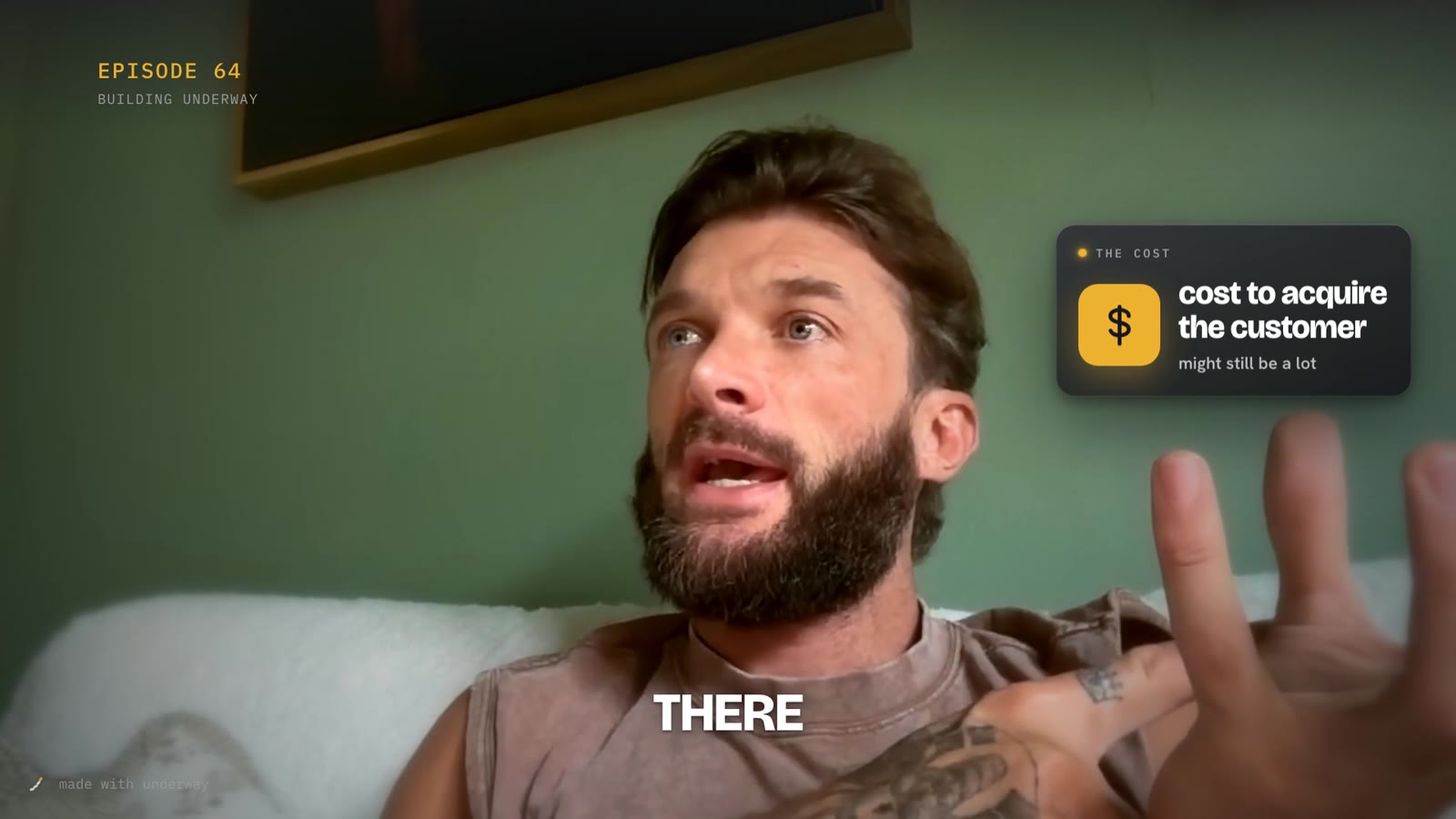
talking head video editing ai, as most tools sell it, does one of two jobs: it cuts your ums and long pauses, or it puts captions on. the edits that hold attention on youtube now do a third job as well. while you talk, what you're talking about appears beside you. the number lands on a card. the idea gets an icon. the two options you're weighing sit side by side. the eye always has something new to look at, and none of it covers your face.
underway now does that third job for you, on every wide episode, on series. you don't place anything, pick a template or open an editor. you talk, the episode is cut the way it always was, and the graphics come from what you said.
what talking head video editing ai adds to an episode
after your episode is cut, underway reads what you said, a minute or so at a time, and picks the moments worth seeing. a new one every two to four seconds, because that is the rhythm the attention-holding edits use. each one lands as you say the words it shows, sits there long enough to read, and slides away when the next thing you say needs the space.
- a number you give, on a glass card, counting up: 300 signups from free.
- a business idea with its own icon: cost to acquire the customer, with a money icon.
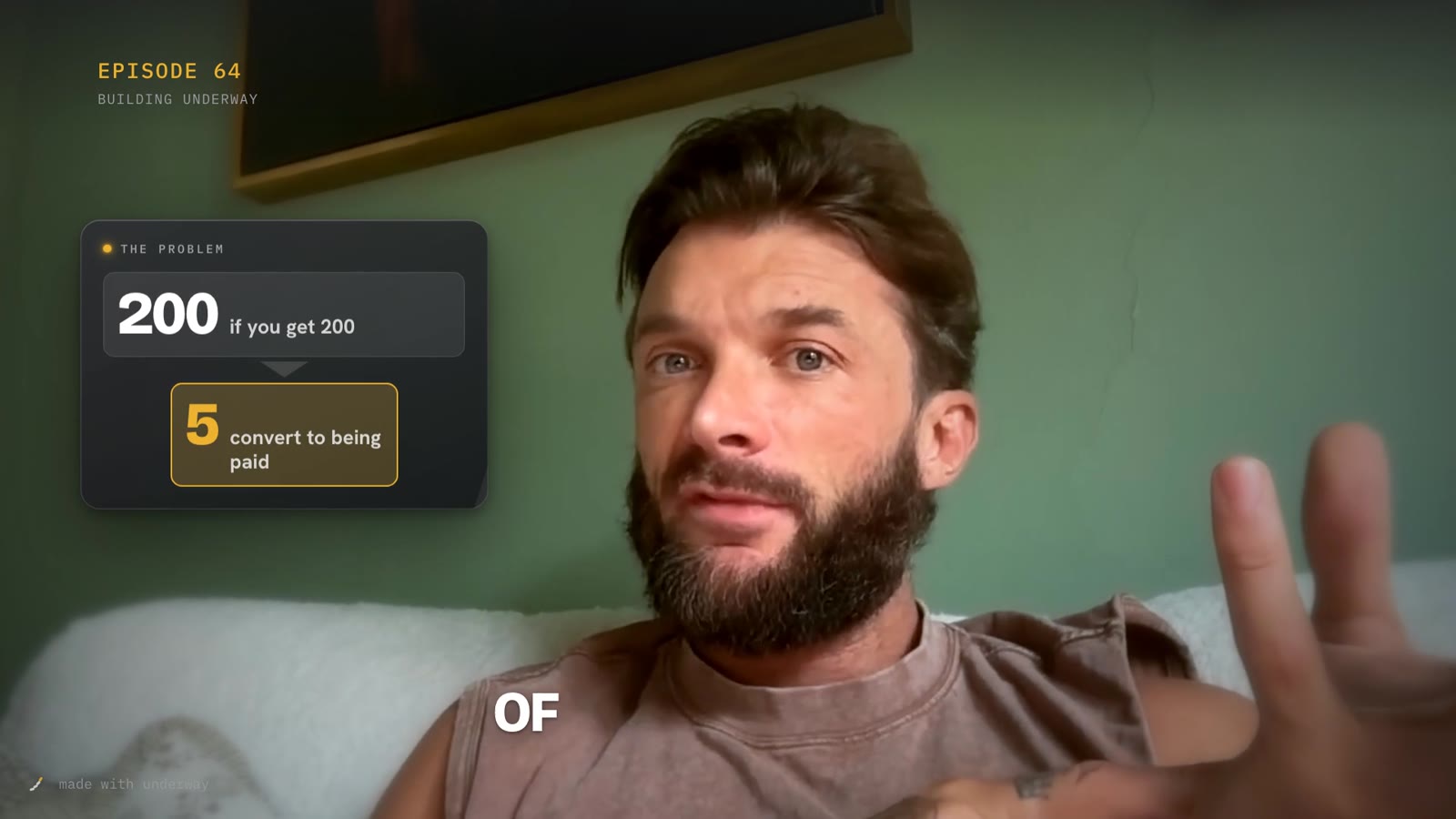
- a funnel when you go from many to few: 200 signups, only five convert.
- two options side by side when you weigh them: free against the direct route.
- a short list that ticks in as you say each part.
- a tool you name out loud, in its own logo, if underway connects to it.
- small tags for a word said in passing, and the odd stamp for a verdict: not great. cheaper.
each card lands with a soft whoosh and each stamp with a low thump, so the sound tells you something changed even when you're half watching. the cards are dark glass with your accent colour on the thing that matters, the same colour your title, captions and episode label already use, so the graphics read as part of your series rather than a template laid over it.
your words, not an editor's
every word on every card is one you said. a number is one you said, and five and 5 count as the same number. the small label at the top of a card, the cost or the plan or two ways, only says what kind of thing the card holds. there are no invented app screens, no made-up charts, no stock people and no logos for tools you didn't name. if a card can't be built from your own words, it isn't shown.
that matters more for a diary than for an ad. the whole point of a build-in-public series is that it shows what happened, in the order it happened, in your voice. the graphics make it easier to follow. they never change what it says, they never move a line, and they never add a claim you didn't make.
it is the same rule the rest of underway already keeps. the cut never reorders you for a hook. a short never opens on words you struck. a thumbnail never shows a screen that didn't exist. motion graphics are one more thing made for you, held to the same line.
where the graphics go, and where they don't
cards sit in the space beside your head, never over your face, favouring whichever side of the frame has more room. a small tag can pop up on the other side while a card is up, so there is usually something on each side of you without anything in front of you.
they only appear while you're on camera, full frame. the intro, the outro, a preview copied in at the start and any screen you share are left clear, because those already have something to look at. if you share your screen to show a dashboard, the dashboard is the picture; the cards come back when you do.
the episode itself keeps no burned-in captions, so people watching on youtube and on your page can switch them on or off. the copy that goes to the feeds that play muted, tiktok, instagram, linkedin and x, carries bold short captions, one to three words at a time, with the key word in your colour, popping in as you say it.
talking head video editing ai versus doing it by hand
you can make an edit like this yourself. in premiere pro, davinci resolve or capcut it means listening back, marking every number and idea worth showing, building a card for each one, keyframing it in and out, adding a sound to each, and checking none of them sits on your face. for a five minute episode with a new visual every few seconds that is close to a hundred small decisions, and an afternoon if you're quick.
an editor can do it for you, and a good one will do it well. the catch is the same one that ends most build-in-public series: it has to happen every day. a daily diary that needs an afternoon of editing, or an editor on retainer, is a diary that stops in week three.
the ai tools on page one mostly start from footage you already have and ask you to choose a style, place the callouts and approve them. underway starts earlier. it asked you the questions, it knows what you were talking about, it already cut the episode, and the graphics go on as part of the same render. there is nothing to place and nothing to approve, and if you would rather an episode went out plain, it's one switch.
how long it takes and what it costs you
nothing extra on your side. the graphics are planned and drawn on underway's machines after the cut, so the episode takes a few minutes longer to finish than it did; for a five minute episode, about four minutes more. you'll see the counter on the episode while it's being made, the same as always.
it is part of series. there is no per-episode charge and no credit to buy. the founder plan keeps the plain edit: your cut, the title card, the episode label in the corner and captions as a track.
how to switch it on or off
motion graphics is on by default on series for wide episodes. it's a switch in polish, on the web and the phone, so it's set once for the whole series, the same as your title look and your branded intro. set it once and forget it; a series looks like a series because every episode gets the same treatment.
on a single episode, the cut has a motion graphics switch under how it opens and closes. turn it off and render it again, and that one episode goes out without it. turn it back on and it comes back. episodes you made before this change keep the file they have until you press render it again on them.
why a diary app does this at all
founders don't quit building in public because they've run out of things to say. they quit because the daily edit costs more than the day can give, and because posting into silence at episode three is demoralising. a talking head with nothing else on screen asks a stranger to do all the work of following you, and most of them won't. an edit with something moving every few seconds asks much less of them, so more of them stay for the next episode.
an editor would charge you for every minute of that. underway does it on the episode you already filmed, while you get on with the next thing. you film, it cuts, it draws, it posts where you've told it to.
music under the whole episode is the next part. the library underway has today is fine under an intro, and not good enough to sit under your voice for minutes at a time, so for now the episodes carry your voice and the sound of the cards, and nothing else.
is this talking head video editing ai available on every plan?
it's on series, for wide (landscape) episodes. the founder plan keeps the plain edit: your cut, the title card, the label in the corner and captions as a track.
will the graphics cover my face?
no. cards sit beside your head, never over it, and only while you're on camera full frame. a shared screen, the intro and the outro are left clear.
does it change what i said?
no. every word on a card is one you said. the cut is the same cut, in the same order; the graphics go on top of it.
can i turn it off for one episode?
yes. on the episode, the cut has a motion graphics switch. turn it off and render it again.
does it work on episodes i've already made?
new wide episodes get it as they're made. an older wide episode gets it when you press render it again on it.
does it work on portrait episodes?
not yet. the cards need the room beside you that a wide frame has. portrait episodes keep their usual edit.