
New in underway
how to remove background noise from video but keep voice
15 October 2026 · 7 min read
Post on X
if you are looking for how to remove background noise from video but keep voice, page one will hand you a dozen upload boxes: drop your file in, wait, download a cleaner one. they work. but if you record in a browser, there is a step that happens before any of them, and it was quietly ruining our founders' audio before a single cleaner got near it.
underway now fixes it at both ends. while you record, the browser is told to leave your voice alone. once the recording arrives, underway's own machines take the background noise out and level the volume, on every recording, before anything is made from it. nothing to upload, no slider, nothing to remember.
why every cleaner sounded the same
this started with a complaint about our own show. an audio episode of building underway, recorded at a desk with no headphones, sounded thin and far away, and not easy to listen to. so we ran the same minute through three things: the clean-up we already had, a free open source voice cleaner called deepfilternet, and a paid voice isolator. all three sounded the same. all three sounded bad.
when three different cleaners make no difference, the noise is not the problem. so we looked at the recording itself, as a picture of its sound: time along the bottom, pitch up the side, brightness for how loud. two things stood out. the voice stopped dead near 12 kHz, where a clear voice carries detail well above that. and the gaps between words were total silence, which no real room ever is.
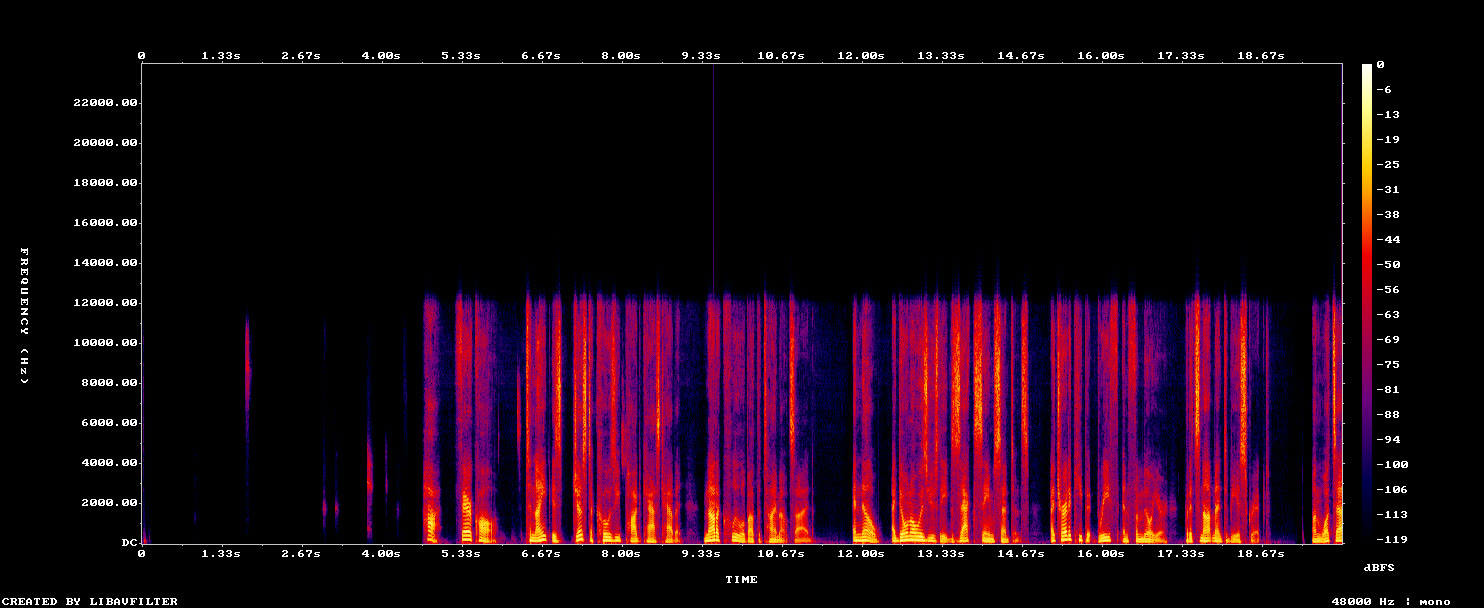
both are the browser's doing. when a web page asks for your microphone, the browser offers to help: noise suppression, automatic volume and echo cancellation, all on by default in most video tools, because they were built for calls. on a call they are useful. on a recording they gate the room to nothing, pump the volume up and down, and strip the top off the voice. by the time a cleaner gets the file, that detail is already gone, and no cleaner can put back what is not there.
how to remove background noise from video but keep voice, in the right order
the order matters more than the tool. first, capture the voice whole, noise and all. second, take the noise out with something built to separate a voice from everything around it. third, level it, so a quiet answer and a loud one sit at the same volume. do it the other way round, cleaning while you record and again afterwards, and every step makes the voice thinner.
- record with the browser's noise suppression and automatic volume off, so your voice arrives with all its detail
- keep echo cancellation on only where something plays out loud while you talk: a co-host, a guest on a call, a clip you are talking over
- take the noise out after, with a model trained to keep the voice and drop traffic, fans, hum and the room
- level it to podcast loudness last, so nobody reaches for the volume between your answers
that is now exactly what underway does, without you choosing any of it.
what underway does now
every recorder that captures your voice for an episode asks the browser for echo cancellation only: the interview on camera, the co-host on voice and on camera, the guest's side of an interview, the take in front of a time-lapse, and a promote film. noise suppression and automatic volume are off.
then, when your episode's file is made, each recording is cleaned once on underway's own render machines with deepfilternet, an open source model that separates speech from noise, and levelled to podcast loudness. a six and a half minute recording takes about twenty five seconds. the voice is cleaned without moving it: we checked the start of every phrase against the picture, and it lands within two thousandths of a second of where it was, so your lips still match your words.
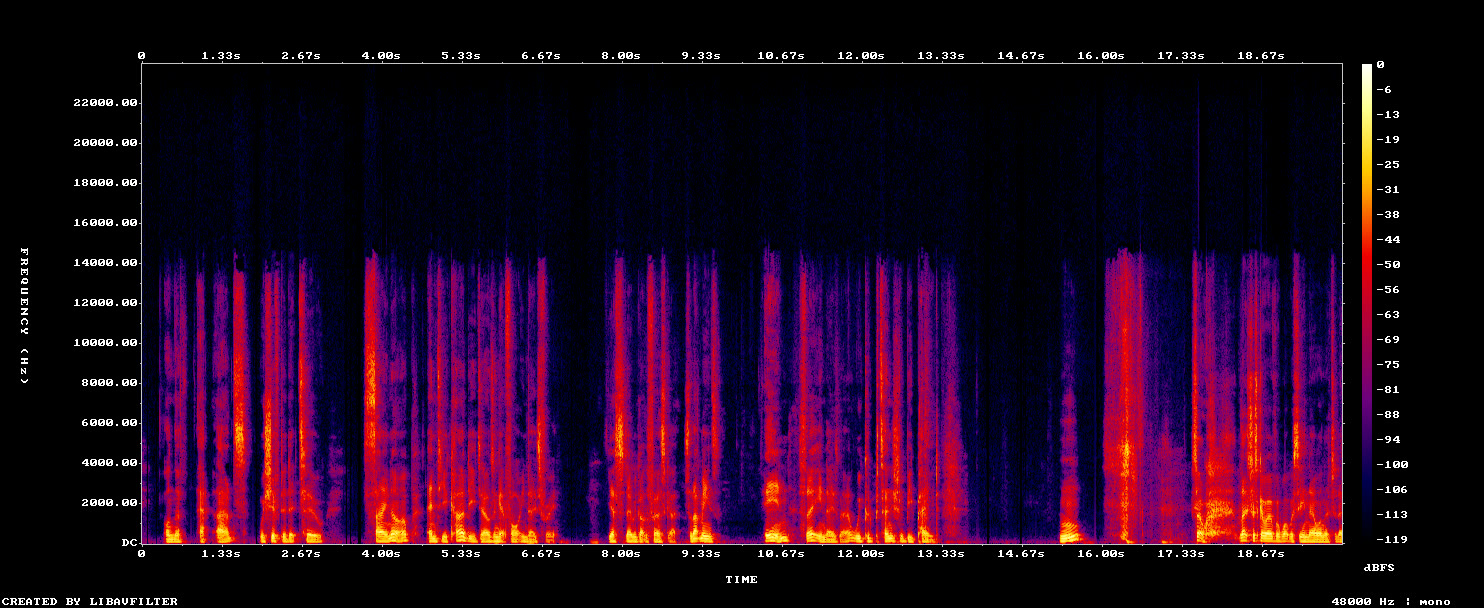
it keeps a trace of the room on purpose. removing every last bit of background leaves a voice that sounds processed, floating in nothing. a little air around you sounds like a person somewhere real, which is what a diary is.
how to remove background noise from video but keep voice, when it is already recorded
if the video already exists, the upload tools on page one are the right answer, and they are good. they all do the second and third steps above: separate the voice from the noise, then level it. some also try to rebuild a voice that was recorded badly, which can help with a thin laptop mic but can also make you sound like someone slightly different, which matters more in a diary than in an advert.
three things decide how well any of them works on your file. how loud your voice was against the noise when you recorded: a voice that sits well above the room cleans up well, and one buried in it does not. whether the detail is still there: a recording a browser or a call app already squeezed has lost its top end, and a cleaner can only work with what is left. and how much you ask it to take away: taking the noise all the way to zero sounds processed, taking most of it sounds like a quiet room.
the catch with any upload box is that it is one more step, every time. download, upload, wait, download again, put it back in the edit. once is fine. every day is a chore, and chores are what end a daily habit. that is why underway does it on every recording by itself, before you ever hear the episode.
what to do on the day you record
- sit close to the microphone, or wear a headset; distance matters more than any setting
- face into the room rather than a bare wall, which throws your voice back at the mic
- wear headphones when a co-host or a guest is talking, so their voice does not come back through your mic
- turn off the fan or the dishwasher if you can, and if you cannot, record anyway: that part is now handled
what it cannot do
no clean-up makes a laptop's built in microphone sound like a studio one. the biggest single improvement is still distance: a headset, or a cheap clip-on mic a hand's width from your mouth, beats anything done afterwards. and an old recording that the browser already thinned only improves a little, because the missing detail was never recorded.
on the phone, recordings made with the camera never went through the browser's call processing, and they get the same clean-up on the way. a co-host call on the phone keeps the phone's call mode, because without it the co-host's voice from the speaker would come back through the microphone.
where to switch it
it is the clean up the dialogue switch in polish, on the web and the phone, and it is on unless you turn it off. it applies to everything you make, set once. episodes you already have pick it up the next time their file is made: press make the file again on any episode and it comes out cleaner.
the rest of what is set once for every episode: how to make your videos look professional.
faqs
do i need to upload anything or press anything?
no. every recording is cleaned when its episode's file is made. the switch is clean up the dialogue in polish, and it is on.
will it change how my voice sounds?
it takes the noise away and evens out the volume. it does not change your voice, its pitch or your words, and it leaves a little of the room so you still sound like you.
does it fix episodes i already recorded?
partly. press make the file again and the noise comes out, but detail the browser already removed when you recorded cannot come back. recordings made from 15 october 2026 keep their full voice.
what about echo from a room with no headphones?
the clean-up takes out a good deal of room sound, but echo is best fixed at the source: headphones when a co-host or a guest is speaking, and a mic close to your mouth.
is this on the phone too?
yes. phone recordings are cleaned the same way when their file is made.