
New in underway
how to make split screen reels without editing them yourself
15 October 2026 · 7 min read
Post on X
if you want to know how to make split screen reels, every guide on page one says the same thing: open capcut or inshot, set the canvas to 9:16, add an overlay, mask it, line the two clips up, then do it all again for the next reel. it works. it is also twenty minutes a reel, and the reason most founders who try it stop after a week.
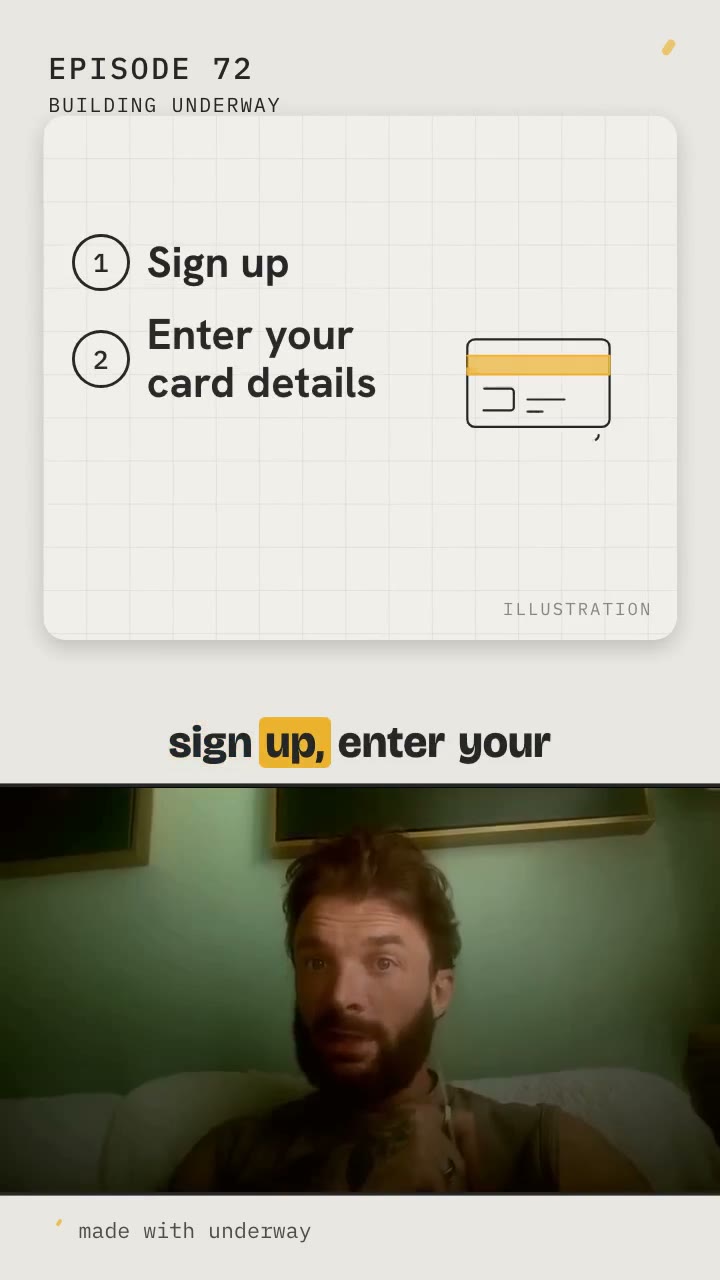
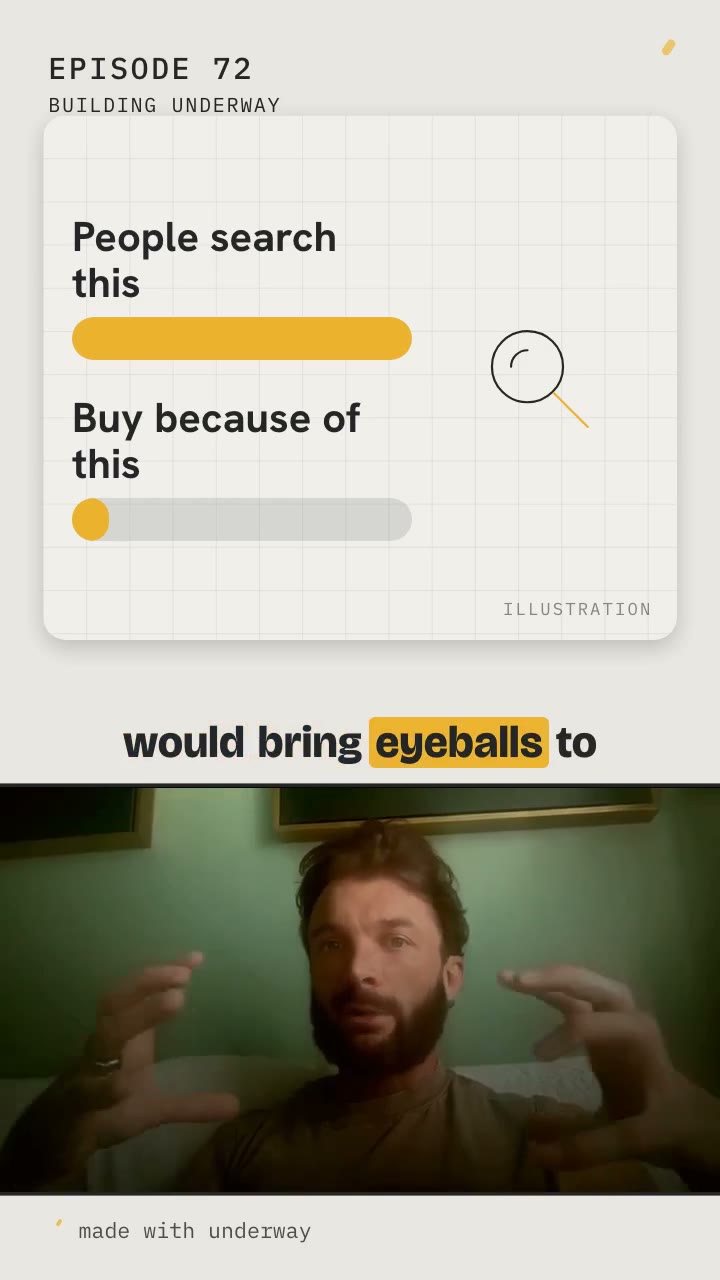
underway now does it for you. every short it cuts from a camera episode is split from the first second to the last: the top half shows a drawing of what you are saying, your captions run across the middle, and you are in a strip along the bottom, the whole width of the shot you filmed. you never open an editor.
how to make split screen reels by hand, and what it costs
the by-hand way is worth knowing, because it shows where the time goes. in capcut you start a project at 9:16, put your talking clip on the main track, add a second clip as an overlay, scale it into the top half, and mask the edge so the two halves meet cleanly. in inshot it is the same idea with picture in picture. instagram's own layout button lets you record or pick clips into a grid, which is quick, but the grid is fixed and only holds footage you already have.
the split itself is not the slow part. the slow part is deciding what goes in the top half for every few seconds of talking, finding or making something worth showing there, and keeping the captions readable while the frame changes around them. for a forty second reel that might be eight decisions, eight things to find and a timeline to line up by ear. once a week that is a hobby. every day it is the edit that eats the evening, and the first thing a founder drops when the week gets busy.
underway takes all of that. it reads the words of each short, decides which moments have something worth drawing, draws it from your own words, and brings each drawing up on the sentence that earns it.
why split screen reels hold attention
a talking head on its own is easy to scroll past: one face, one frame, nothing new to look at for thirty seconds. a split gives the eye a second thing to read while the voice carries on, and when that second thing changes with what is being said, the viewer keeps reading to see the next one. the face never leaves, so you keep the person, which is what a build in public audience follows you for.
we tried the other way first: a split that came in for a few seconds and went back to full frame. it looked choppy, in and out, in and out, and the drawing was gone before you had read it. so the split now stays for the whole short and only what is in the top half changes. each drawing stays up until the next one replaces it, which gives every one time to land.
how to make split screen reels without editing them yourself
- film an episode in underway on camera, any length, portrait or landscape
- when the episode's file is made, its shorts are cut on their own; find clips on the shorts tab makes a fresh set any time
- each short opens with its strongest line in big type in the top half, so the first thing a stranger sees is the point
- then, as you talk, the top half changes to a drawing of what you are saying, a new one every few seconds
- your captions run across the band in the middle, word by word, and you talk in the strip underneath from start to end
the strip at the bottom is the shape of a landscape shot, so if you filmed wide, the whole of your shot is there, nothing cropped off the sides. if you filmed portrait, the strip is framed on your face.
what goes in the top half
six kinds of drawing, each made only from what you said in that clip, and most of them with a picture beside the words:
- a list, with the things you have done ticked and the next one lit, when you run through what you tried or what is left
- bars, when you say most of your time went on one thing and almost none on another
- a number, big, when you say one
- two things side by side, when you weigh one against the other and land on it
- numbered steps, when you say what happened in order
- a simple line drawing of a thing or idea you named out loud: a credit card for card details, a magnifying glass for search, an envelope for an email, a keyboard for typing
when you name a tool underway connects to, github, slack, whatsapp, youtube, stripe and the rest, the short shows its real logo in its own colours as you say its name, rather than a drawing of it.
every drawing carries the word illustration in its corner, so nobody mistakes it for something you filmed.
nothing on it you did not say
this is the rule that makes it allowed. every word in a drawing is a word you said in that clip. a number has to be one you said, written the way you said it. a picture stands for something you named out loud. a label you did not say, a figure you did not give, or a thing you never mentioned is refused before anything is drawn, and when too many are refused the drawings are written again, told why, so the top half never sits on one drawing for too long.
there are no made-up screens, no messages and no people in the drawings, and no logo except a tool you named that underway connects to. the episode itself is never split: the diary stays you, in order, as you said it. the split is for the short, which is an advert for the episode, made to stop a stranger's thumb and send them to the whole thing.
it looks like your series, not like ours
the drawings take the look you already chose for your episode's intro and outro: shutter, explainer, broadcast, brushstroke or kinetic type. explainer draws on paper with a highlighter and a stamp; broadcast sweeps bands of your colours in like a news open; brushstroke paints your colour behind the words; kinetic type slams big words in one at a time; shutter closes your card colour in with your accent along the edges. one choice covers the intro, the outro and every short, so the whole series reads as one show.
the colours and the typeface are yours too. the accent, the card colour and the font you set on your series' brand are what the drawings are made of. change them once and every short made after follows. with no title look chosen, the drawings sit on plain dark panels in your colours.
where you shared your screen
if you shared your screen while you talked and the short's own words point at it, look at this, this page, this number, the short shows your real screen instead of a drawing. real footage of the thing beats a drawing of it every time.
what about shorts you already have
shorts made before 15 october 2026 stay as they were, and nothing you have posted changes. press find clips again on an episode and the new set is split the new way. a guest interview's short stacks your guest on top and you underneath, with no drawings, because two faces are the picture.
audio episodes get the drawings across the whole frame
an audio episode, the audio interview or a conversation with the co-host on voice, has nobody to show, and nobody wants to watch a waveform. so its shorts are the drawings across the whole frame: the opening line first, then each drawing as it is said, with both voices captioned underneath on the real timing of every word.
how each short's opening line is chosen in the first place: how to make a good hook for youtube shorts.
faqs
do i have to choose the drawings?
no. they are chosen from what you said in each short, checked against your words, and drawn for you. find clips again makes a fresh set.
can a drawing say something i did not?
no. a label, item, number or picture that is not in the short's own words is refused before anything is drawn.
why is my face smaller than in a normal short?
the strip shows nearly the whole width of your shot, zoomed in a little on you, so a wide shot still shows some of the room around you. filming a little closer makes you bigger in it.
can i change how the drawings look?
yes. they follow your title look and your brand colours and typeface, set once for the series. change either and every short made after follows.
does this change my episodes?
no. only the shorts are split. the episode stays you, full frame, in order, as filmed.
does it work on the phone?
yes. shorts are made on underway's own machines, so an episode filmed on the phone gets the same split shorts.